Least Privilege for AI Agents: Access by Task
Learn how least privilege limits what AI agents can read and do, with a practical access review for Microsoft 365 and connected business tools.
Least privilege means giving an AI agent only the data access, tools, and actions required for its assigned task. It should not inherit every permission held by the employee, administrator, or service account that created it.
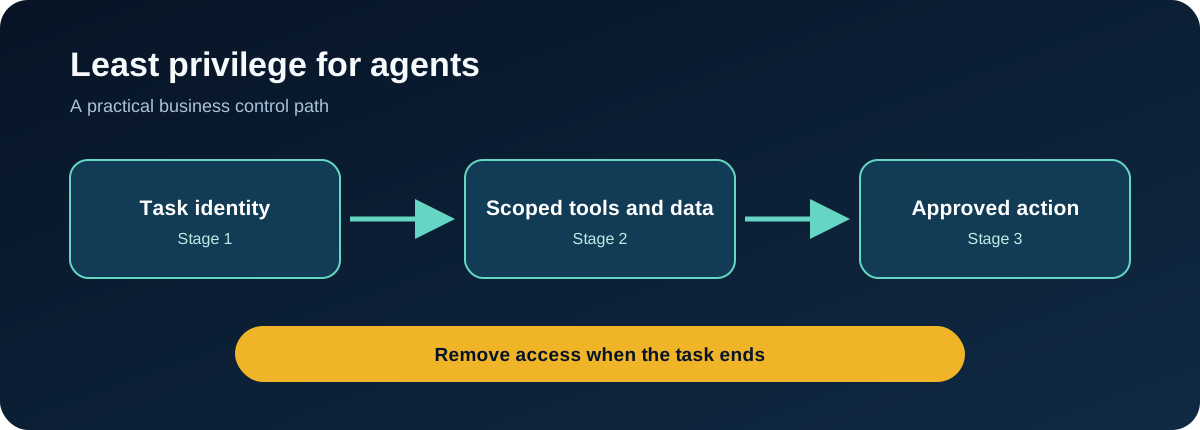
This matters because an AI agent can combine access across systems. A summarisation task can become an email action. A research task can become a file-sharing action. Broad permissions increase the impact of a mistake, prompt injection, compromised credential, or poorly defined instruction.
Human access and agent access are not the same
An operations manager may need broad access to email, files, calendars, and business applications. An agent working for that manager may only need to read messages in one mailbox and draft a response.
If the agent inherits the manager's full access, the business has granted permissions based on convenience rather than task requirements.
OWASP's AI Exchange describes user-based and intent-based layers of least privilege for AI systems. The useful business principle is that access should reflect both who the agent represents and what the current task requires. OWASP AI Exchange
Apply least privilege in five layers
Identity
Give the agent its own identity where possible. Avoid shared administrator accounts and credentials that cannot be traced to a specific agent.
Data
Limit the mailboxes, folders, SharePoint sites, databases, and client records the agent can retrieve. Separate client contexts when one customer should never influence another customer's output.
Tools
Allow only the tools required for the job. A research assistant may need search and read access but no ability to send email or modify records.
Actions
Separate read, draft, approve, send, change, and delete permissions. Require a person to approve higher-risk or irreversible actions.
Time
Grant temporary access for a task or session where possible. Remove unused permissions and review standing access on a schedule.
A practical access review
For each agent, create a table with these fields:
| Question | Decision |
|---|---|
| What exact job does the agent perform? | One-sentence purpose |
| Whose identity does it represent? | Named user, team, or service |
| What information can it read? | Approved sources |
| What can it create or change? | Allowed actions |
| What always requires approval? | High-risk actions |
| How long does access last? | Session, temporary, or standing |
| What gets logged? | Retrieval, tool calls, actions, approvals |
| Who reviews access? | Named owner and date |
Common mistakes
- Giving an agent the same access as its creator
- Using one shared credential for several agents
- Treating read and write access as equivalent
- Allowing general-purpose tools when a narrow function would work
- Leaving temporary permissions in place
- Adding new connectors without revisiting the threat model
- Logging activity without assigning someone to review alerts
FAQ
Does least privilege make an agent safe?
It reduces possible impact, but it is one control. Input validation, output checks, human approval, monitoring, testing, and response planning are still needed.
Can an agent use a person's Microsoft 365 permissions?
Some platforms support delegated access, but the business should still examine whether the agent needs every permission the person holds.
How often should access be reviewed?
Review it when the agent's job, tools, data sources, owner, or model changes. Standing access should also have a scheduled review date.
Before deploying an AI agent, ask what it needs for this task, not what access is easiest to grant.
Put this control into practice
Start with one AI workflow that handles sensitive, operational, or client information. Document its tool permissions, approval gates, and action logging. Test the process with a normal request, an unsafe request, and an error case before expanding its use.
QuantM helps Canadian SMBs connect AI governance with identity, Microsoft 365, cybersecurity, and documented business controls. If your team needs a practical baseline, an AI and Cyber Governance Diagnostic can identify the first control gaps to address.
Related AI security guides
- Securing AI Agents: A Practical Business Control Framework
- OpenAI API Key Security: Project Controls for Business
- System Prompt Security: Why Instructions Are Not Access Controls
- Prompt Jailbreaking: What It Means for Business AI Security