AI Model Integrity: Prove the Right Model Runs
Learn how hashes, signatures, provenance records, access controls, and runtime checks help verify that the approved AI model is running.
AI model integrity verification provides evidence that the model and related artifacts running in an environment are the approved versions and have not been altered without authorization. It covers more than the model file. Data, code, configuration, dependencies, prompts, adapters, and deployment settings can all change system behaviour.
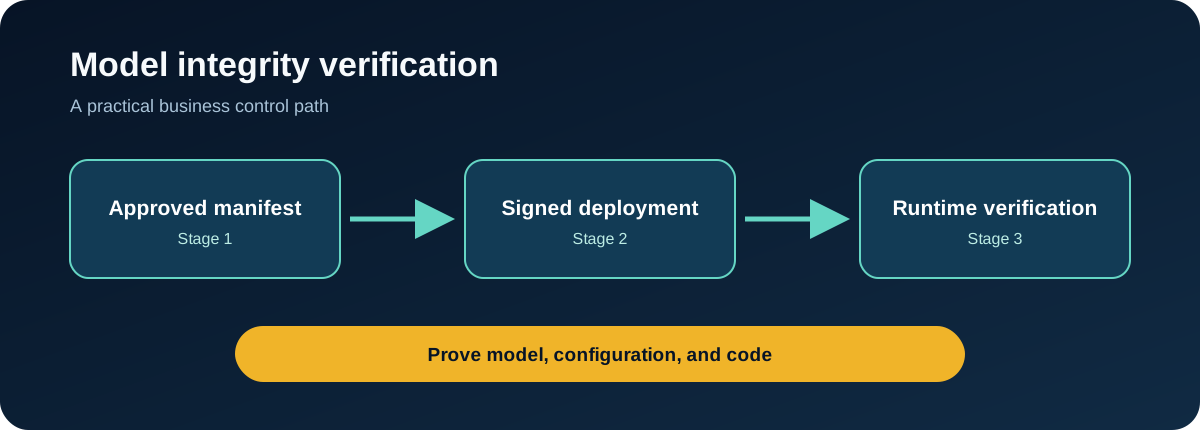
The business question is simple: can the team prove what was approved, what was deployed, who changed it, and whether the evidence is still valid?
What model integrity includes
An integrity process should identify:
- model weights and version
- training or fine-tuning lineage
- adapters and safety components
- inference code and dependencies
- system instructions and policy files
- approved configuration
- artifact source and owner
- release and deployment records
A hash can show that a file changed, but it cannot prove the original file was trustworthy or approved.
Build a chain of evidence
Establish provenance
Record where the model came from, its license, publisher, version, training or modification history, evaluation results, and approved use.
Create an approved manifest
List each release artifact and its cryptographic digest. Include code, weights, configuration, adapters, dependencies, and policy assets.
Sign and protect releases
Use controlled build and release identities. Protect signing credentials, restrict artifact repositories, and require review before a release is promoted.
Verify during deployment
Compare deployed artifacts with the approved manifest before starting the service. Fail safely when verification does not match.
Monitor the environment
Record model loads, configuration changes, administrative actions, artifact downloads, and unexpected restarts. Verify important artifacts periodically and after incidents or platform changes.
Integrity and behaviour are different
An unchanged model can still produce unsafe or incorrect results because its inputs, retrieval sources, tools, or operating conditions changed. Integrity checks should therefore sit beside performance testing, access control, data validation, and monitoring.
Likewise, a model that appears to behave normally may still have been replaced. Behavioural tests alone do not prove artifact identity.
Responding to an integrity failure
- Stop promotion or isolate the affected deployment.
- Preserve the artifact, manifest, logs, and release records.
- Compare hashes, signatures, source, and deployment history.
- Identify every environment using the artifact.
- Restore from a known approved release.
- Review access to repositories, build systems, and signing credentials.
- Evaluate whether data or outputs were affected.
- Correct the root cause and issue new trusted artifacts where needed.
Review checklist
- Is there an approved manifest for each production model?
- Are artifacts obtained from approved sources?
- Are hashes and signatures checked before deployment?
- Are build and release permissions separated?
- Can the team trace who promoted each version?
- Are prompts, adapters, and configuration included?
- Does a mismatch stop or contain deployment?
- Is restoration from a trusted version tested?
FAQ
Is a checksum enough to verify a model?
No. It detects change relative to a known value. You also need confidence that the reference value and artifact came from an approved source.
What should be signed?
Sign or otherwise bind the full release manifest, including the model, supporting code, configuration, dependencies, and relevant policy assets.
How often should integrity be checked?
Check before deployment and after changes or incidents. Higher-risk systems may also require scheduled or runtime verification.
Prove the deployment, not just the file
Create a manifest for one production AI service and verify the complete approved release before it starts. That provides a practical foundation for model supply-chain evidence.
Put this control into practice
Start with one AI workflow that handles sensitive, operational, or client information. Document its logging, alert ownership, and response procedures. Test the process with a normal request, an unsafe request, and an error case before expanding its use.
QuantM helps Canadian SMBs connect AI governance with identity, Microsoft 365, cybersecurity, and documented business controls. If your team needs a practical baseline, an AI and Cyber Governance Diagnostic can identify the first control gaps to address.
Related AI security guides
- AI Data Provenance and Lineage: Building a Traceable Evidence Trail
- AI Robustness Testing: Will the System Behave Safely When Conditions Change?
- Concept Drift Monitoring: Keeping AI Reliable After Launch
- MITRE ATLAS for AI Security: A Practical Business Guide