Securing AI Agents: A Business Control Framework
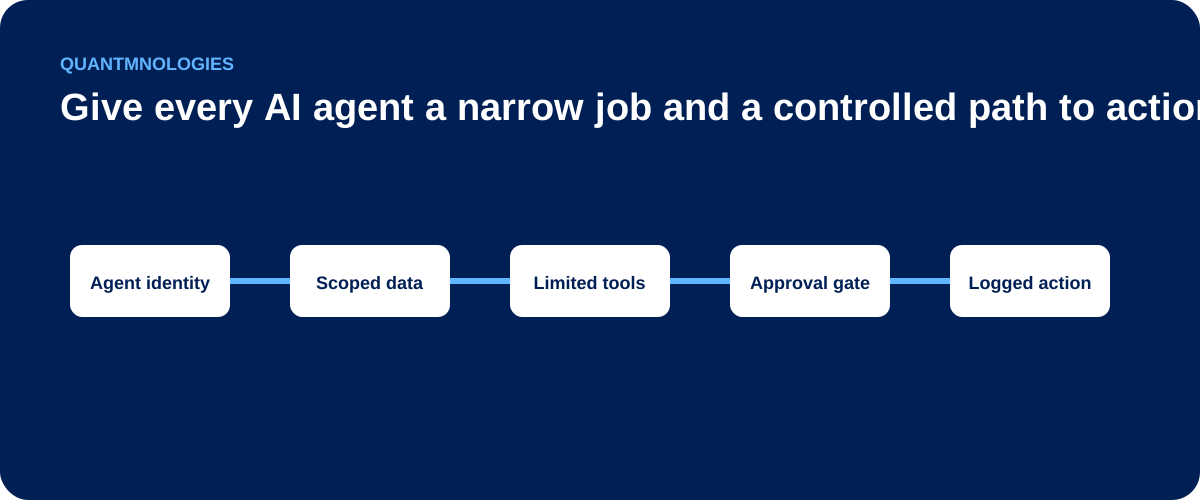
Give every AI agent a narrow job, its own identity, limited permissions, approval gates, and a clear shutdown path.
Securing an AI agent means controlling its identity, data access, tools, actions, and audit trail. An agent that can only draft text presents one level of risk. An agent that can read email, update records, share files, or trigger business processes requires stronger controls because a wrong or manipulated decision can create a real action.
The safest starting point is to treat an AI agent as a non-human worker with a narrow job, its own identity, limited permissions, and a manager who remains accountable.
Why agents change the security question
| Agent capability | Default permission | Additional control |
|---|---|---|
| Read approved records | Scoped read access | Identity-aware retrieval |
| Draft a response | Draft only | Human review before release |
| Create an internal ticket | Limited execution | Action logging |
| Send external messages or change records | No direct execution | Explicit human approval |
A chatbot usually returns an answer. An agent can plan a sequence of steps and call tools to complete them. This ability creates value, but it also expands the impact of a mistake, an unsafe instruction, or an account compromise.
Docker's overview of agent security highlights isolation, access control, observability, and protection of the surrounding environment. Microsoft describes agent safety as a shared responsibility that includes validating input, protecting data flows, and configuring tools for the specific scenario. Docker, Microsoft
For leadership, the problem can be reduced to four questions.
1. Who is the agent?
Give each production agent a distinct identity. Do not let multiple agents share a general administrator account or a long-lived credential.
Record:
- the business owner
- the technical owner
- the purpose of the agent
- the systems it can access
- the person or role on whose behalf it acts
- the date its access was last reviewed
A distinct identity makes access decisions, logging, investigation, and removal more manageable.
2. What can the agent access?
Start with the minimum data and tools required for the defined task.
An agent that schedules meetings may need calendar access. It should not automatically receive access to every mailbox, SharePoint site, CRM record, or finance system available to its owner.
Use narrow permissions, approved connectors, separate client contexts where needed, and short-lived credentials where the platform supports them. Review inherited Microsoft 365 access before enabling retrieval across email or files.
3. What can the agent do without approval?
Separate read-only work from state-changing actions.
Low-risk activity may include retrieving an approved document or drafting a response. Higher-risk activity includes:
- sending external email
- changing access permissions
- publishing content
- sharing client files
- updating financial or legal records
- deleting information
- making purchases
Require human approval at the point of action. The approval should show what the agent plans to do, which data it used, and which system will change.
4. Can the business see and stop it?
Log the agent's inputs, data sources, tool calls, approvals, outputs, and errors. Protect those logs because they may contain sensitive information.
Define a response path:
- Pause the agent or revoke its credentials.
- Preserve relevant logs.
- Identify the systems and records it accessed.
- Review actions taken and data exposed.
- Correct unsafe permissions or workflow rules.
- Document what happened and what changed.
Without a stop mechanism and an owner, monitoring only tells the business that a problem occurred.
A pre-launch checklist
- The agent has a named business and technical owner.
- Its job is documented in one sentence.
- It uses its own identity.
- Permissions are limited to the job.
- Approved tools and data sources are listed.
- High-risk actions require approval.
- Activity is logged.
- A test set covers normal, incorrect, and malicious inputs.
- Someone can disable the agent quickly.
- Access and performance have a review date.
FAQ
Are model guardrails enough?
No. Model-level controls are useful, but permissions, tool boundaries, approval, logging, and response controls should operate outside the model as well.
Should an agent inherit a user's full access?
Usually not. The user may have permissions that are unrelated to the agent's task. Granting that full access increases the possible impact of error or misuse.
Who owns AI agent security?
The business owner decides the purpose and acceptable risk. Technical and security owners implement access, monitoring, testing, and response. Accountability should not be left with the AI vendor alone.
Before connecting an agent to Microsoft 365 or another operational system, map its identity, permissions, actions, and shutdown path.
Put this control into practice
Start with one AI workflow that handles sensitive, operational, or client information. Document its tool permissions, approval gates, and action logging. Test the process with a normal request, an unsafe request, and an error case before expanding its use.
QuantM helps Canadian SMBs move from AI interest to approved use cases, working tools and workflows, team training, and secure operating practices. Start with a free AI readiness assessment to identify the strongest next move.
Related AI security guidance
- AI Security Learning Centre
- Tool and Agent Security
- AI Alignment for Business
- RAG Security
- OpenAI API Key Security for Business