LLM Input Validation: Check Data Before the Model
A practical guide to validating prompts, files, retrieved content, tool output, and memory before an AI workflow uses them.
LLM input validation checks the content entering an AI workflow before the model uses it. That includes a user's prompt, an uploaded file, retrieved documents, tool output, and stored memory. The goal is to reduce malicious instructions, unsuitable data, malformed requests, and unexpected behaviour before they affect an AI-assisted decision or action.
Input validation reduces risk. It cannot guarantee that an LLM will never be influenced by hostile content. A secure workflow also limits the permissions available to the AI, validates any action it requests, requires approval when the consequence is high, and records what happened.
Why LLM input validation needs a different approach
Traditional software validation can enforce a fixed format. An email field must contain an address. A date must use a recognised date format. An LLM application also receives natural language, where a helpful request and an attempt to redirect the workflow can look similar.
OWASP describes prompt injection as a vulnerability that lets malicious input change an LLM application's intended behaviour. The risk exists because instructions and the data the model is asked to process can reach the same context. OWASP's prompt injection prevention guidance covers direct requests as well as instructions hidden in documents, webpages, emails, and retrieved records.
The security question is therefore broader than whether a phrase is blocked. A business needs to know every way content reaches the model and what the model can cause to happen after it reads that content.
Map every path into the workflow
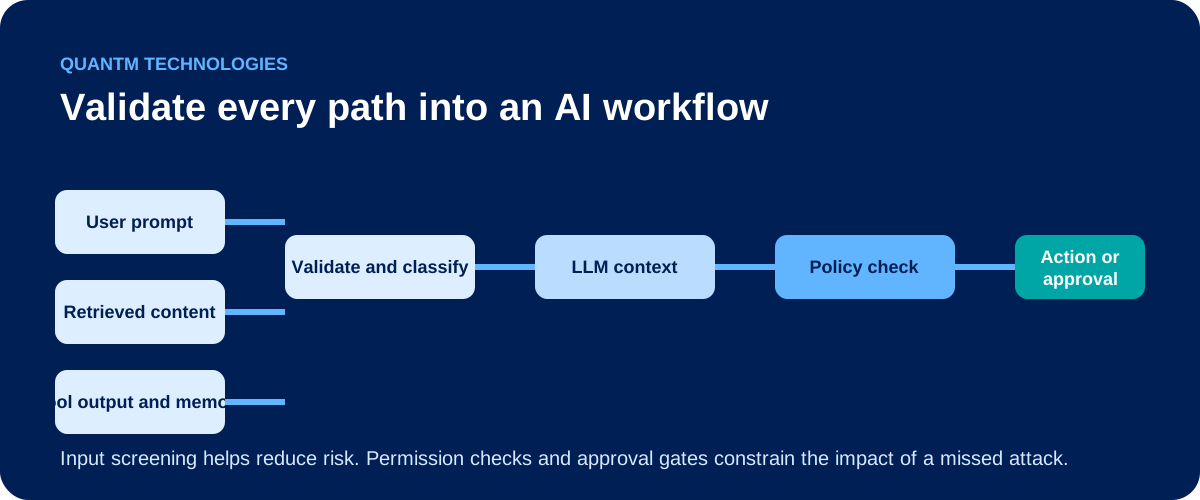
Validate each point where content crosses into the AI workflow. Checking only the chat box leaves gaps when the application can retrieve information or use connected systems.
| Input path | Typical example | Control objective |
|---|---|---|
| User request | A chat prompt or form submission | Reject malformed requests, restricted data, and obvious attacks |
| Files and external content | A client document, email, website, or attachment | Treat the source as untrusted data and scan before processing |
| Retrieval | A SharePoint, OneDrive, or knowledge-base result | Enforce source approval and the user's existing access rights |
| Tool output | A CRM result, API response, or search result | Validate structure and prevent returned content from becoming a new instruction |
| Memory and agent messages | Stored preferences, task history, or another agent's output | Apply provenance, retention, and integrity controls |
AWS identifies retrieved external content, tool output, inter-agent messages, and memory reads as input surfaces that need controls. Its guidance also warns against validating direct user input while allowing unvalidated retrieved content into the agent's context. AWS Agentic AI Lens
Apply controls that match the input
Some controls can be deterministic. Others identify suspicious content and require a response path. Use both, based on the workflow's consequence and the type of input.
| Control | What it does | Where it belongs |
|---|---|---|
| Schema validation | Checks required fields, data types, allowed values, and argument formats | Forms, tool calls, APIs, and workflow parameters |
| Length and file limits | Rejects content that exceeds approved size or context limits | Prompts, uploads, retrieval results, and tool output |
| Normalisation and encoding checks | Detects unusual encodings, invisible characters, and representation tricks | Text submitted by users or obtained from external sources |
| Source validation | Restricts approved connectors, domains, folders, and knowledge sources | Retrieval, web access, integrations, and file ingestion |
| Prompt-attack detection | Flags content that appears to redirect the model or bypass rules | All untrusted natural-language inputs |
| Data screening | Identifies restricted, confidential, or personal information | Prompts, documents, output, and logs |
The OWASP AI Security Verification Standard includes input normalisation, mitigation for encoding and representation smuggling, length controls, and screening of inputs that could steer model behaviour. Use strict checks when an application expects structured data. A model should not be able to turn an informal sentence into a database update, file share, or external message without a typed, validated request.
Natural-language screening helps detect known and suspicious patterns, but it must not become the only barrier before a sensitive action. Attackers can change wording, hide instructions inside ordinary content, or test variations until a weak filter misses one.
Keep untrusted content separate from workflow authority
An AI assistant may be asked to summarise a vendor email or review a client document. The email and document should remain data to analyse. They should never acquire the authority to change the workflow's instructions.
Structured message roles and clear separation between trusted instructions and untrusted content can make that boundary easier for the model to follow. They are useful supporting controls. The UK National Cyber Security Centre cautions that prompt injection cannot be fully eliminated in the way traditional SQL injection can. It recommends deterministic safeguards that constrain the system's actions as well as measures that make attacks harder.
For a business AI workflow, that means attaching a source label to retrieved content, limiting what each connector can access, and ensuring external content cannot expand the AI's permissions.
Validate the action after the model responds
Input validation protects the route into the model. The workflow still needs controls at the route out.
Before an AI-generated request can send an email, change a record, share a file, export data, or alter access, validate the requested action in application code. Confirm the user is authorised, the target is allowed, the arguments match the approved schema, and the action falls within the tool's scope.
Require human approval for actions that are external, irreversible, expensive, privileged, or capable of exposing sensitive information. An AI can assist with a draft message or a proposed record update. The permission and approval gate should decide whether the business carries out the action.
This approach aligns input validation with the controls described in QuantM's guide to securing AI agents, including scoped permissions, approval gates, and action logging.
Test the validation path and retain useful evidence
Test the workflow with normal requests, malformed input, suspicious prompts, untrusted documents, and unexpected tool results. Include the connectors and retrieval sources that the workflow uses in production. A chat-only test cannot show whether an uploaded document or a connected API can influence the AI.
Log validation decisions, blocked requests, tool-call attempts, approval events, and errors. Keep the evidence necessary to investigate an issue without creating an uncontrolled repository of sensitive prompts and files. Review repeated blocks and failed actions so the team can identify a broken integration, a poorly tuned control, or an attempted attack.
A practical starting point for a business AI workflow
Start with one workflow that handles sensitive, operational, or client information. List its input paths and connected tools. Decide which sources are approved, what must be rejected, which requests need review, and who can approve or stop the workflow.
Then connect the input controls to the related questions of prompt injection and AI data loss prevention. Those pages cover the risk of untrusted instructions and the rules for handling sensitive information. Together, the controls make approved AI use easier to explain and review.
QuantM helps Canadian businesses assess AI use cases, data handling, permissions, workflow controls, and operational evidence through an AI + Cyber Governance Diagnostic.
FAQ
Does LLM input validation prevent prompt injection?
It reduces exposure and can block or flag some attacks. It cannot guarantee prevention, so sensitive actions need independent permission checks, approval gates, and monitoring.
Should a RAG system validate retrieved documents?
Yes. Retrieved documents are an input path. Restrict the knowledge sources, preserve source provenance, enforce access rights, and treat retrieved content as untrusted data before the model uses it.
Are system prompts enough to secure an AI workflow?
No. System prompts guide model behaviour. They should be supported by deterministic authorization, tool-argument validation, approval requirements, and logging outside the model.