AI Data Loss Prevention for Generative AI
A practical control model for keeping sensitive business and client information out of unsafe AI workflows.
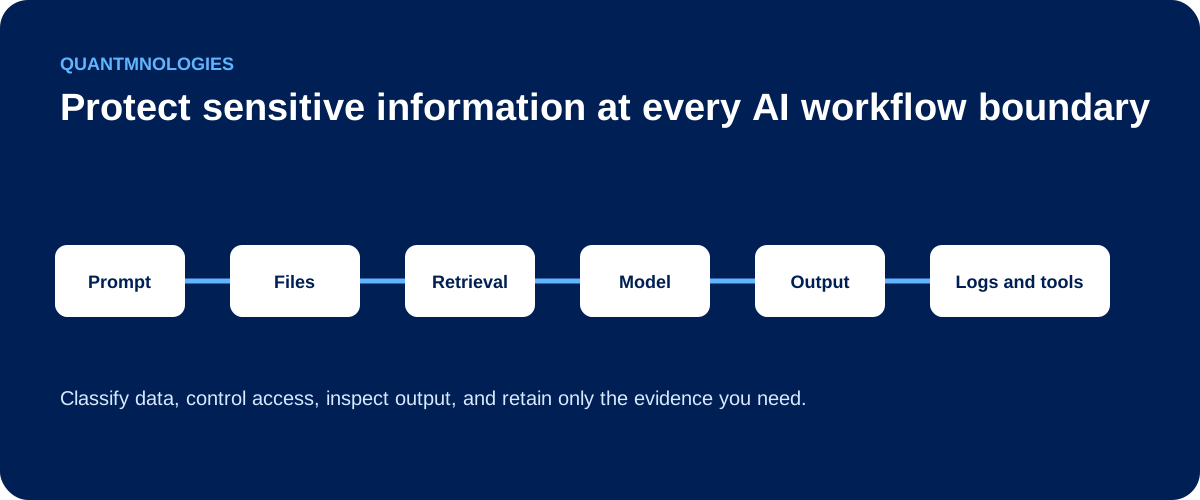
AI data loss prevention is the set of policies and technical controls used to keep sensitive information from entering, moving through, or leaving an AI workflow without approval. It covers more than what employees type into a chatbot. It also covers uploaded files, retrieved documents, generated answers, activity logs, and connected tools.
For a professional-services business, the question is not simply whether an AI vendor protects data. The business must know what information employees are allowed to use, which AI tools are approved, what those tools can access, and who responds when a policy is broken.
Where sensitive data can leak
AI creates several data paths that traditional acceptable-use policies may not fully address.
Prompts
An employee may paste client correspondence, financial information, personal data, credentials, contract terms, or internal strategy into an AI tool.
Uploaded files
A document can contain hidden details that the employee does not notice, including comments, revision history, metadata, or pages outside the section they want reviewed.
Retrieval
An internal assistant may search SharePoint, OneDrive, email, or another knowledge base. If access controls are too broad, the AI may retrieve information the user should not receive.
Outputs
An answer can repeat sensitive information from a prompt or retrieved document. It can then be copied into email, a report, or a client deliverable.
Logs
Prompts, outputs, tool calls, and error messages may be stored for monitoring or troubleshooting. Those logs can become another sensitive-data repository.
Connected tools
An AI agent may send an email, update a CRM record, share a file, or call an external service. Data can leave the approved boundary through the action, even if the chatbot response looks harmless.
Cloudflare's DLP documentation describes controls that scan AI prompts and responses for sensitive data. That is one useful layer, but a business still needs governance around approved tools, identities, permissions, retention, and response. Cloudflare
The OWASP Generative AI Security Project also treats data protection as a system-wide concern, rather than a setting in one AI product.
A practical AI DLP control model
| Information type | Approved use | Required control |
|---|---|---|
| Public information | Approved AI workflows | Basic policy and source review |
| Internal business information | Approved, managed tools | Access control and retention rules |
| Client or regulated information | Only when specifically approved | Data classification, authorization, logging, and review |
| Credentials and secrets | Never submit | Block, redact, and rotate if exposed |
1. Classify the information
Define simple categories employees can understand, such as public, internal, confidential, client-restricted, and regulated. State which categories can be used with each approved AI tool.
2. Approve the tools
Maintain an inventory of sanctioned AI tools and connected applications. Record the business owner, data handled, access granted, retention settings, and review date.
3. Control input
Scan or block prompts and files containing restricted data. Where appropriate, redact, mask, or replace sensitive values before the information reaches the model.
4. Enforce access during retrieval
An AI assistant should not gain broader access than the person using it. Apply role-based access, source allowlists, and separate client or business-unit data where needed.
5. Inspect output and actions
Review generated content for sensitive information before it is displayed, sent, or passed to another system. Require human approval for external sharing or higher-risk actions.
6. Monitor and respond
Log policy violations, unusual access, blocked actions, and repeated attempts to use restricted data. Define who investigates, who can disable a connector, and how the incident is documented.
The employee policy must match the technical controls
Training employees to remove client names is useful, but it is not enough. Sensitive context can remain in a document, prompt history, attachment, or connected source. A policy works better when approved tools, data classifications, access controls, and monitoring support the same rules.
The goal is not to block every use of AI. It is to make approved use clear and to reduce the chance that a well-intentioned employee creates an avoidable client-data problem.
Questions for leadership
- Which AI tools can employees use today?
- What client or regulated information is prohibited?
- Can approved AI tools search Microsoft 365 data?
- Do they inherit the user's full permissions?
- Are prompts, outputs, and logs retained?
- Who sees a policy violation?
- Who can stop the workflow and investigate?
FAQ
Is AI DLP the same as blocking ChatGPT?
No. Blocking one public tool does not address every AI feature, browser extension, embedded assistant, API, or agent. AI DLP should cover the data flow across approved and unapproved uses.
Can redaction solve the problem?
Redaction is one control. It does not replace access control, tool approval, output review, logging, or response ownership.
Where should a business start?
Start with an inventory of AI tools and connected data sources. Then classify the data employees handle and decide which combinations are allowed.
If your business is connecting AI to Microsoft 365 or client documents, map the full data path before expanding the workflow.
Put this control into practice
Start with one AI workflow that handles sensitive, operational, or client information. Document its approved AI tools, data-handling rules, and ownership. Test the process with a normal request, an unsafe request, and an error case before expanding its use.
QuantM helps Canadian SMBs move from AI interest to approved use cases, working tools and workflows, team training, and secure operating practices. Start with a free AI readiness assessment to identify the strongest next move.