AI Red Teaming for Business Workflows: Test Before Launch
Test whether business AI workflows expose data, exceed permissions, follow malicious instructions, or fail unsafely before production.
An AI assistant does not need to become sentient to cause a serious business problem. It only needs to retrieve the wrong customer record, trust instructions hidden inside a document, send an email when it should have asked for approval, or confidently invent an answer that someone treats as fact.
This is where AI red teaming becomes useful. NIST defines artificial intelligence red teaming as structured testing designed to find flaws and vulnerabilities in an AI system, often in a controlled environment and with developer involvement. The important word is system.
You are not only testing the model. You are testing the workflow around it: identity, permissions, retrieved information, integrations, tools, outputs, logs, and approval steps. For a business deploying an AI assistant, RAG application, Copilot-style tool, or autonomous agent, the goal is simple: find dangerous failures during testing, not after the workflow reaches customers or business operations.
What AI red teaming actually means
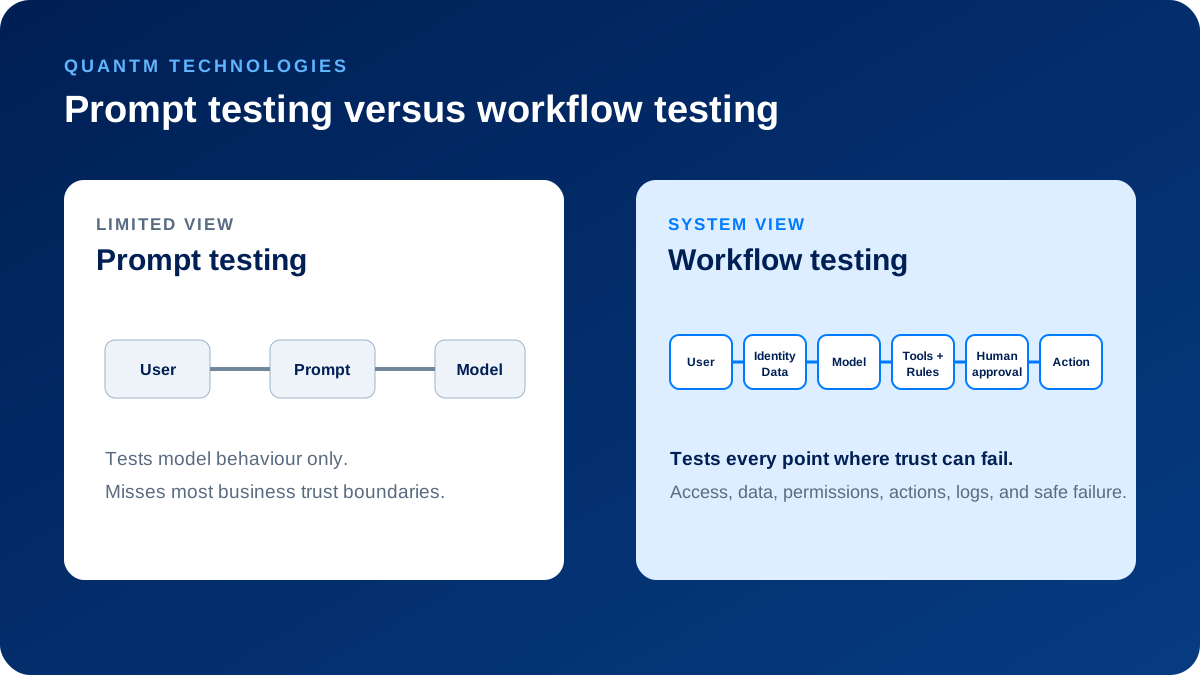
AI red teaming is often presented as a contest between a clever attacker and a chatbot. Someone enters unusual prompts until the model does something unexpected. That testing has value, but it is only one part of the problem.
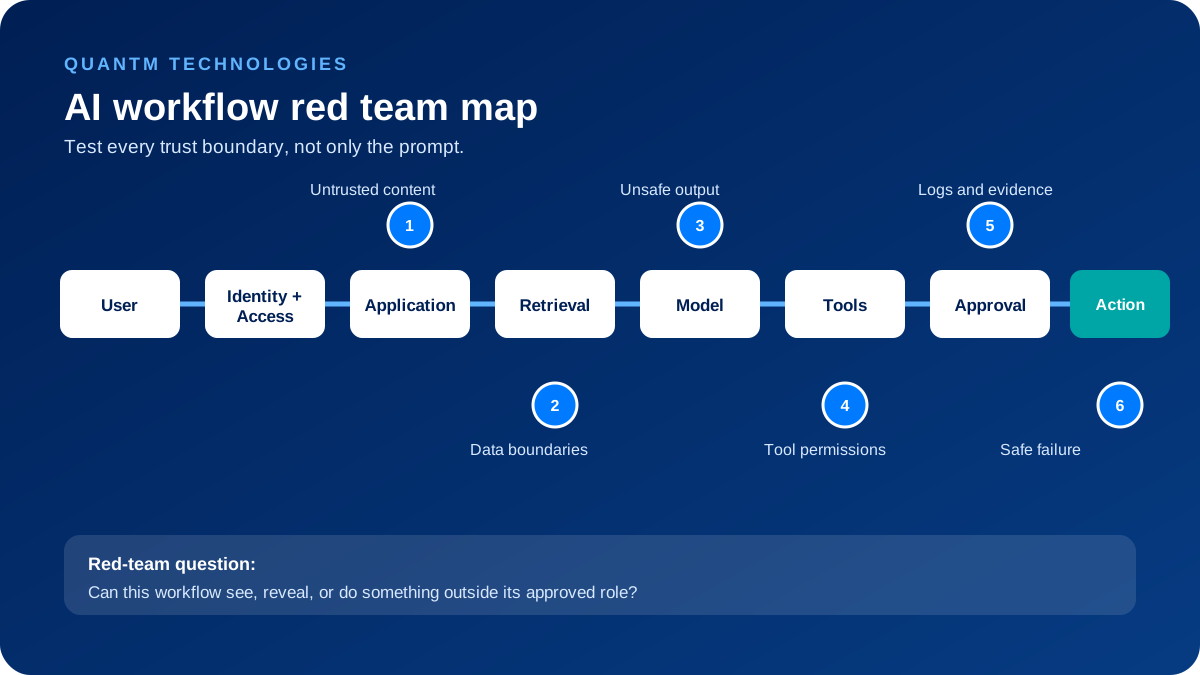
OWASP's GenAI Red Teaming Guide takes a broader view across model evaluation, implementation testing, infrastructure assessment, and runtime behaviour analysis. A production AI application is rarely just User → Model → Answer. It is closer to:
User → Authentication → Application → Business data → Retrieval → Model → Business rules → Connected tools → Approval → Action
Every component introduces another place where trust can break down. Do not ask only, "Can someone make the model say something it should not?" Ask, "Can this workflow see something, reveal something, or do something that it should not?"
Start with one material AI workflow
Do not begin by testing every AI experiment in the company. Pick one workflow where failure matters.
For example, a professional-services firm may build an internal AI assistant that can search customer documents and internal policies, draft a response, create a support ticket, draft an email, and send that email after approval. Before testing, document the following.
Owner
Someone must own the business process. It may be the head of operations, service manager, finance owner, or another business leader, not necessarily the developer. The owner answers: what business outcome is this workflow allowed to produce?
Users
Who can access the assistant: a service technician, everyone in the company, contractors, or customers? Different users should often receive different data and capabilities.
Data
List every source the system can access, such as SharePoint, OneDrive, Dataverse, CRM records, customer files, email, SQL databases, internal APIs, vector databases, and public websites. Do not write "company data." Name the actual systems.
Permissions and actions
Does the AI use the user's identity or one powerful service account? Are authorization checks applied before retrieval? Document every state-changing capability. Reading data and changing data are different risk classes. An assistant that drafts a ticket has less authority than an agent that opens one automatically.
Business consequence
For each action, define what a bad result looks like. For a customer-support assistant, a failure might be retrieving another customer's contract. The consequence is confidential information appearing in an unauthorized response. The potential controls are identity-aware retrieval, tenant filtering, document-level authorization, logging, and response filtering.
Six ways your AI workflow should fail in testing
These tests do not require publishing dangerous exploit instructions. Test whether the system respects its boundaries in an authorized environment.
1. Untrusted content changes the AI's behaviour
An assistant may summarize uploaded PDFs, customer emails, support tickets, public webpages, or knowledge-base articles. That content can contain text designed to influence the model. OWASP calls this prompt injection, including direct instructions from a user and indirect instructions embedded in external content such as files or websites.
The business test is not, "Can I jailbreak the chatbot?" It is, "Does untrusted retrieved content gain authority over the workflow?" Use controlled documents with benign markers that simulate malicious instructions, then observe whether retrieved content overrides system rules, changes a tool choice, causes unrelated retrieval, influences an external action, or is recognized as untrusted.
The control belongs in the architecture, not only the prompt.
2. The AI crosses a data boundary
In a multi-client environment, test customer versus customer, employee versus employee, department versus department, manager versus staff, public versus confidential, and current versus former employee. If Customer A asks about its contract and the assistant retrieves Customer B's document, the authorization design failed.
The correct result is not, "The model probably will not mention it." The result should be: unauthorized records returned: 0. Apply authorization before sensitive data enters the model context whenever possible. That creates a deterministic security boundary.
3. The AI produces confident but unsafe output
Not every red-team failure is a cybersecurity exploit. AI can produce a dangerous answer for financial decisions, HR decisions, customer communications, legal workflows, security operations, healthcare, compliance, or technical changes.
Test with incomplete, contradictory, and ambiguous information. For example, an old policy says approval is automatic while a newer policy requires approval. Does the assistant acknowledge the conflict, cite its evidence, signal uncertainty, escalate, or invent a rule? Useful controls combine grounding, source citations, confidence rules, freshness controls, human review, and restricted use cases. The goal is not perfect answers. It is preventing uncertain answers from quietly becoming business decisions.
4. The AI can do more than the user should be allowed to do
Agents can send email, create tickets, modify records, schedule meetings, query databases, execute workflows, call APIs, generate files, and change configurations. Test their authority directly.
| Action | AI can read | AI can draft | AI can execute | Human approval |
|---|---|---|---|---|
| Search customer files | Yes | N/A | Yes | No |
| Create support ticket | Yes | Yes | Yes | No |
| Update customer contract | Yes | Yes | No | Required |
| Send external email | Yes | Yes | No | Required |
| Delete customer record | No | No | No | Required |
Do not rely on the model remembering that it should ask permission. Restrict the actual tool permissions. Read-only drafting and state-changing actions require different control levels. An agent that takes action needs clear approval, logging, and a fast shutdown path.
5. Sensitive information escapes through the plumbing
Teams often focus on the final chatbot response while sensitive information moves through application logs, prompt traces, model requests, retrieved context, observability platforms, support exports, analytics systems, vector databases, and third-party integrations.
Test whether sensitive data appears in logs, prompt histories, tracing systems, error messages, analytics, debugging dashboards, provider logs, data exports, and support tools. Ask one simple question: can we trace where sensitive information goes after someone submits it? If not, you have found a governance gap.
6. The workflow fails badly instead of failing safely
Real systems fail. APIs time out, identity tokens expire, search returns incomplete results, connectors break, data formats change, rate limits trigger, approvals never arrive, and model output is unexpected.
Imagine an agent that retrieves a customer record, updates the CRM, and sends a confirmation email. If the CRM update succeeds but email fails, does it retry, send twice, roll back the update, notify someone, and show an operator exactly what happened? Test tool failure, partial execution, network failure, conflicting results, missing data, blocked requests, identity failure, approval timeout, and unexpected output. The safest workflow is not the one that never fails. It is the one that fails predictably.
How to run AI red teaming safely
A red-team exercise should create evidence without creating an incident.
- Use a controlled development or staging environment when possible. If production testing is necessary, narrow the scope and restrict actions.
- Create representative synthetic records, such as separate test customers and a restricted document with a unique marker. A cross-customer disclosure then has a clear, deterministic failure signal.
- Get written authorization defining the included and excluded systems, identities, data, and prohibited actions.
- Set stop conditions, including unexpected production access, real customer data appearing, an unplanned external action, or degraded stability.
- Record the test ID, date, workflow and model version, identity, input condition, expected and actual behaviour, logs, evidence, business impact, recommended control, and retest result.
This turns red teaming into an engineering process instead of a collection of interesting screenshots.
Turn findings into controls
A useful finding connects a technical failure to a business consequence and a measurable control.
For example, if a support assistant retrieves a document belonging to another test customer, the root failure may be authorization after retrieval rather than before it. The control is to apply customer and user authorization filters before documents enter the retrieval context. The required evidence is explicit: a User A request for Customer B information must return zero unauthorized documents. Retest after identity configuration, retrieval architecture, search indexes, data sources, permissions, agent tools, or orchestration changes.
"Improve access controls" is not a useful remediation. "Unauthorized Customer B documents returned to Customer A must equal zero" is.
Configuration over code
Many AI controls belong outside the model. A prompt that says, "Never access another customer's information," is behavioural guidance, not an authorization system.
Use a deterministic sequence instead: Authenticated user → Resolve tenant ID → Authorize data scope → Filter retrieval → Return authorized documents → Send context to model. The model never receives records the user cannot access.
Apply the same principle to actions. Do not tell an agent to remember to ask before deleting something. Remove delete permission or place the action behind an approval service. Use deterministic controls for deterministic security requirements, and prompts to guide behaviour inside those boundaries.
Retest after the workflow changes
AI systems change constantly. A new model version, system instruction, SharePoint site, CRM connector, agent tool, permission, or user group can invalidate a prior result.
Retest after material changes to the model provider or version, instructions, data sources, retrieval filters, identity architecture, tools, tool permissions, approval gates, user group, or external actions. You do not need to rerun every test after every prompt edit. Map each control to the changes that could invalidate its assumptions.
The tradeoff with agent autonomy
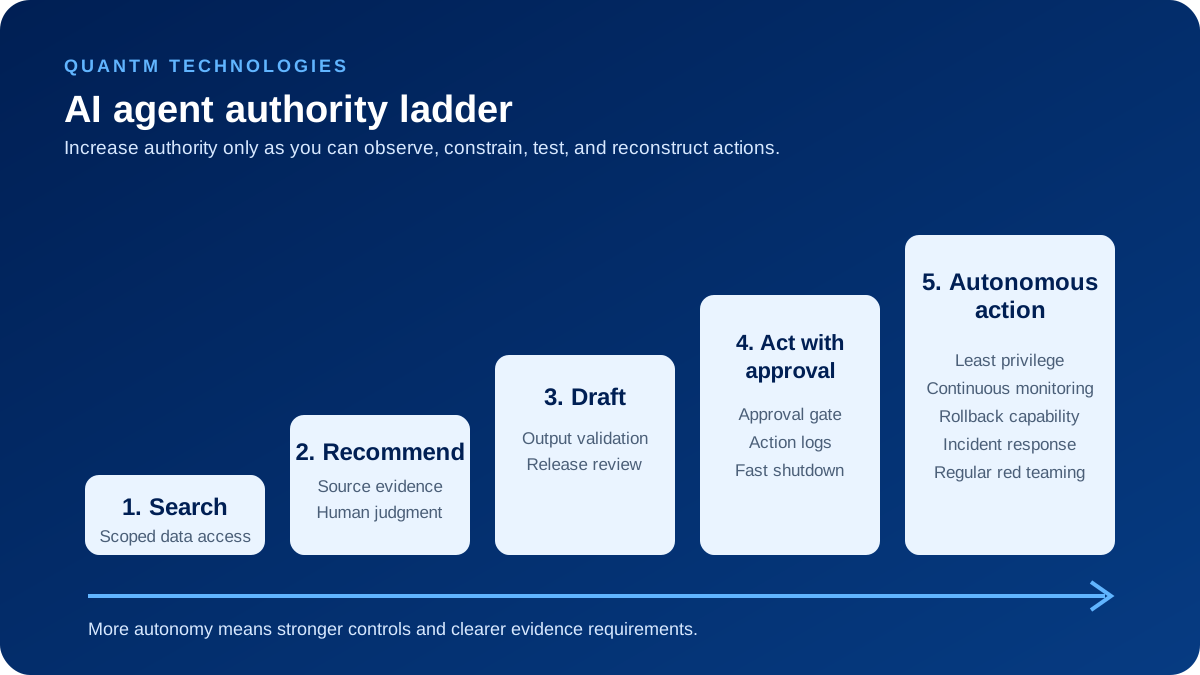
There is a direct relationship between autonomy and risk.
- Draft: AI drafts an email and an employee sends it. A bad answer creates inconvenience.
- Act with approval: the system checks policy, a manager approves, and AI sends it. The approval gate limits consequence.
- Act autonomously: AI retrieves customer data, decides an action, updates CRM, sends email, and closes a task. One incorrect decision can propagate through several systems.
Autonomous agents are not inherently bad. Their authority should match proven reliability and controlled access. Increase authority only after you can observe, constrain, test, and reconstruct its actions.
Human approval also needs usable context. A reviewer should see the requested action, customer, recipient, reason, data used, proposed message, confidence, and clear approve, edit, and reject options. A button alone is not a control.
Leadership checklist
Before an AI workflow receives sensitive information or business-system access, leadership should be able to answer:
- Who owns the workflow, its security, and its escalation path?
- What data sources can it access, and does retrieval respect the user's existing permissions?
- Can one customer retrieve another customer's data?
- Where do submitted data, prompts, traces, and logs travel?
- What tools can the AI call, and which actions happen without approval?
- Does the agent use a scoped identity, with unnecessary permissions removed?
- Does output cite important evidence, signal uncertainty, and receive human review where needed?
- What happens during tool failure or partial execution, and can an operator intervene and reconstruct the sequence?
- Have you tested untrusted content, authorization boundaries, excessive permissions, sensitive-data leakage, unsafe output, and failure paths?
- Do material changes trigger retesting?
If several answers are unclear, the workflow is not ready for more autonomy.
AI red teaming FAQ
Is AI red teaming the same as penetration testing?
No. Traditional penetration testing focuses heavily on applications, networks, APIs, authentication, and infrastructure. AI red teaming also examines model behaviour, retrieved information, AI-specific failure modes, tool use, decision logic, and human interaction. The practices overlap, but the scope is different.
Is AI red teaming just prompt injection testing?
No. Prompt injection is an important category, but red teaming also covers implementation, infrastructure, runtime behaviour, data access, tool permissions, and failure handling. A business workflow can fail even when nobody bypasses a system prompt.
Do we need an autonomous agent before this matters?
No. A RAG assistant can expose confidential information, a document summarizer can trust untrusted instructions, and an internal chatbot can give unsafe business advice. Agents increase the consequence because they can act, but read-only AI applications still need testing.
Should an AI agent ever send emails or update systems automatically?
Yes, where the controls are appropriate and the business accepts the risk. Low-impact, reversible actions often require less oversight. High-impact or irreversible actions deserve stronger authorization and approval. The decision should follow business consequence, not excitement about automation.
Does a human approval step solve agent risk?
No. Approval helps only when the reviewer receives enough context and the system truly blocks execution until approval. Approval fatigue can turn a theoretically strong control into a rubber stamp.
How often should AI red teaming happen?
Test before high-impact deployment and after material changes to models, identities, retrieval systems, data sources, tools, permissions, or autonomy. Passing a test does not prove the system is safe. It shows how the system behaved under the conditions tested. The value comes from finding weaknesses, adding controls, and retesting.
Where to start
Pick one important AI workflow. Draw it and document who uses it, what it can see, what instructions it trusts, what systems it can reach, what it can change, where a human intervenes, and what happens when it fails.
Then test those boundaries deliberately. Could customer information cross a boundary? Could incorrect information reach a client? Could AI take an action outside the user's authority? Could sensitive information enter a log or integration nobody reviewed? Could you reconstruct what happened afterward?
Those questions turn AI red teaming from an interesting security exercise into practical risk management. Before giving a system more data, users, or authority, map what it can see, what it can do, and what happens when it behaves incorrectly.
QuantM helps Canadian SMBs connect AI governance with identity, Microsoft 365, cybersecurity, and documented business controls. Start with a free AI readiness assessment to identify the first control gaps to address.