What Is Ransomware? A Simple Guide for SMBs
Learn how ransomware reaches small businesses, what attackers do after entry, and how to prepare for detection, response, and recovery.
What SMB leaders should know
- Ransomware can encrypt systems, steal information, and interrupt the services a business relies on.
- Preparation should combine access controls, monitoring, response authority, and tested recovery.
Ransomware in plain language
For a small or mid-size business, ransomware can become an operational, privacy, financial, and customer-service incident at the same time. The practical question is not whether ransomware is the only cyber risk. It is whether the organization can limit access, recognize suspicious activity, make authorized decisions, and restore important services when normal systems are unavailable.
What Is Ransomware (Plain Language Guide)
Ransomware is software created by criminals that breaks into your computer systems and locks all your files so you cannot access them. Once your files are locked (encrypted), the attackers display a message demanding that you pay a ransom, typically in Bitcoin or another cryptocurrency, to receive the key that unlocks your files.
Think of it like someone changing all the locks on your office building overnight, then calling you to demand payment for the new keys. Except in the digital world, the "locks" are strong encryption that cannot practically be broken without the key, your "office building" is every computer, server, and file share in your organization, and the "locksmith" is a criminal organization that may or may not give you working keys even after you pay.
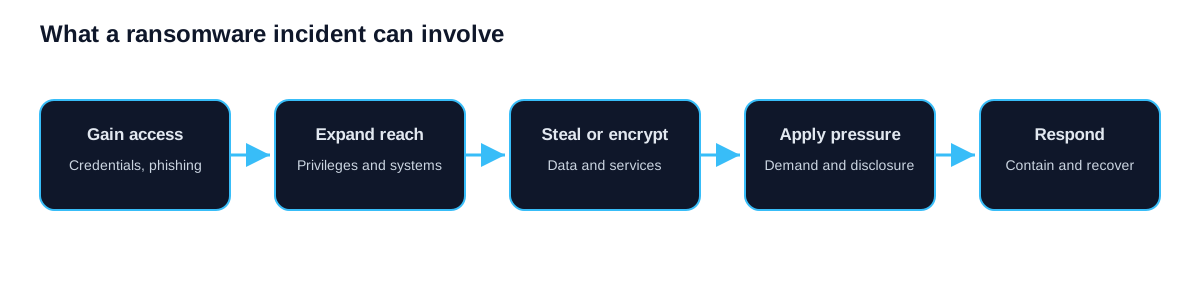
Modern ransomware can involve more than file encryption. Attackers may copy sensitive information before disrupting systems, then use threatened publication or direct contact with customers and partners to increase pressure. Recovery planning therefore needs to address both service restoration and possible unauthorized access to information.
Types of Ransomware Attacks
Not all ransomware operates the same way. Understanding the different types helps you prepare for the specific threats targeting your industry.
Crypto ransomware encrypts files or systems so normal users and applications cannot access them. Signs can include changed file extensions, failed applications, inaccessible shared folders, and ransom notes. The exact symptoms depend on the ransomware and the systems it reaches.
Locker ransomware does not encrypt individual files but locks you out of your entire operating system. You cannot log in or access anything on the machine. This type is less common in business environments but still active.
Double extortion ransomware combines system disruption with a claim that information was copied. The claim still requires investigation, but a successful restore does not resolve the privacy, contractual, or legal questions created by possible data access.
Ransomware-as-a-Service (RaaS) describes a criminal business model rather than a ransomware type. Developers or operators provide tooling and infrastructure to affiliates who obtain access and conduct attacks. This division of labour lets participants specialize in access, deployment, negotiation, or money movement.
How Ransomware Works Step by Step
A ransomware attack follows a predictable sequence that typically unfolds over days or weeks before the encryption event:
Step 1, Initial Access: The attacker gains entry to your network, most commonly through a phishing email with a malicious attachment or link, exploiting an unpatched vulnerability in internet-facing software, compromised Remote Desktop Protocol (RDP) credentials, or a third-party vendor with access to your systems.
Step 2, Establishing Persistence: Once inside, the attacker installs backdoors to maintain access even if their initial entry point is discovered. They create new user accounts, install remote access tools, and schedule tasks that re-establish their connection if it drops.
Step 3, Reconnaissance and Lateral Movement: The attacker explores your network, identifying valuable data, critical systems, and administrative credentials. They move from machine to machine, escalating their privileges until they have domain admin access.
Step 4, Data Exfiltration: Before encrypting anything, the attacker may copy sensitive customer, financial, employee, or business information. The attacker can then use threatened publication as additional extortion pressure.
Step 5, Disabling Defenses: The attacker disables antivirus, deletes backup snapshots (Volume Shadow Copies), and turns off security monitoring tools to ensure the encryption runs unimpeded.
Step 6, Encryption: The ransomware executes and attempts to encrypt files across systems the attacker can reach. The timing depends on the environment, access, tooling, and defensive response. Ransom notes may appear with payment instructions and a deadline.
Step 7, Extortion: The attacker contacts you demanding payment, typically through a Tor-based "negotiation portal." They set deadlines, threaten to increase the ransom or publish stolen data, and may even contact your customers directly.
What Happens If You Pay the Ransom?
Payment does not establish that a decryption tool will work, that copied information will be deleted, or that the attacker no longer has access. Recovery still requires investigation, credential changes, clean restoration, validation, and legal and insurance decisions. The response plan should identify who can assess these issues rather than treating payment as a recovery control.
The clear consensus among cybersecurity professionals and law enforcement is this: do not plan to pay. Plan to prevent, detect, and recover.
More answers are in Ransomware Protection for SMBs: 40 Questions.
Frequently Asked Questions
Can ransomware spread to cloud services?
Yes. If ransomware compromises credentials for cloud services like Microsoft 365, Google Workspace, or cloud storage platforms, it can encrypt or delete cloud-hosted files. Ransomware can also spread through synced folders, if a local file is encrypted and that folder syncs to the cloud, the encrypted version replaces the clean one.
How long does a ransomware attack take?
There is no reliable universal timeline. Initial access may remain unnoticed while an attacker explores systems, or disruptive activity may follow quickly. Test the time from a representative alert to investigation, authorized containment, business escalation, and clean recovery in your own environment. Those measured intervals are more useful than a market average.
Are Mac computers safe from ransomware?
No. While ransomware targeting macOS is less common than Windows-targeting variants, it exists and is growing. Mac-specific ransomware families have been documented, and cross-platform ransomware written in languages like Rust can target Windows, macOS, and Linux simultaneously.
A Canadian small-business decision guide
This article explains the threat. Continue with the ransomware protection pillar for the full control model, common ransomware infection paths for entry and movement, and the small-business response plan for incident decisions.
The Ransomware-as-a-Service guide explains how criminal roles can be divided among access sellers, affiliates and tool operators.
Canadian organizations should treat ransomware as both an operational disruption and a possible privacy breach. Encryption may stop work, but data theft can create separate duties even when systems are restored. The Office of the Privacy Commissioner of Canada explains that organizations subject to PIPEDA must assess whether a breach creates a real risk of significant harm, report qualifying breaches, notify affected individuals, and retain records of every breach. Provincial privacy rules or sector requirements may also apply. Legal counsel should determine the obligations for a specific incident.
The practical lesson is to map the definition of ransomware to business decisions. A suspicious attachment is an email-security event. A stolen password is an identity event. Remote command execution is an endpoint or server event. Large file transfers may signal data theft. Rapid file changes can indicate encryption. These signals arrive in different tools, so someone must be responsible for joining them into one incident view and acting on them at any hour.
What to check before an incident
Start with the systems that would stop revenue, service delivery, payroll, production, or customer communication. Record who owns each system, where its data is stored, which identities can administer it, and what other services it depends on. This inventory gives the response team a recovery order that reflects business impact instead of technical convenience.
Review the controls around those systems. Multi-factor authentication should cover remote access, administrator accounts, email, and cloud applications. Internet-facing software needs an accountable patch owner and a defined remediation window based on severity and exposure. Endpoint protection should send alerts to a monitored queue. Backups need separate credentials, protection from deletion, and a documented restore test. These checks make the broad idea of ransomware protection measurable.
| Question | Evidence to request | Why it matters |
|---|---|---|
| Can an attacker reuse one password to reach critical systems? | MFA coverage and sign-in policy reports | Stolen credentials often provide the first foothold |
| Would suspicious endpoint activity be reviewed overnight? | Monitoring schedule, escalation route, and test alert | Detection without an owner does not produce a response |
| Can administrators alter or delete every backup copy? | Backup access model and immutability settings | Attackers often target recovery systems before encryption |
| Has a complete restore been timed? | Restore record, elapsed time, and unresolved errors | A successful backup job does not prove recoverability |
| Who can isolate a device or disable an account? | Approved response actions and contact list | Authority gaps slow containment |
How to explain ransomware risk to leadership
Avoid a single industry-average loss figure. The more useful estimate starts with the business itself. Calculate the contribution lost during one hour or one day of interruption, then add emergency technical work, legal advice, notification, customer support, replacement equipment, overtime, and contract consequences that plausibly apply. Model several outage lengths because recovery time is uncertain. Keep ransom payment outside the recovery plan; payment does not guarantee decryption, deletion of stolen data, or freedom from a second demand.
Leadership should also see the assumptions behind the estimate. A manufacturer may be constrained by production throughput. A professional-services firm may be more exposed to missed deadlines and confidential client data. A retailer may depend on payment and order systems. A credible assessment identifies these differences rather than presenting a universal ransomware cost.
A useful first exercise
Run a short tabletop exercise with an operations leader, the internal or outsourced IT lead, privacy or legal counsel, communications, and the person who can authorize emergency spending. Give the group a simple scenario: several endpoints show ransom notes, the file server is unavailable, and a threat actor claims to have copied customer data. Ask who declares the incident, who preserves evidence, who contacts the insurer, which systems are isolated, how staff continue essential work, and what evidence is needed before customer notification.
Record decisions, owners, and missing information. The exercise should end with a small remediation list and dates, not a generic statement that more security is needed. Repeat it after material technology or staffing changes.
Sources
- Canadian Centre for Cyber Security, Ransomware playbook
- NIST, Ransomware guidance for small businesses
- PIPEDA section 10.1
If you need help turning these checks into a scoped plan, contact QuantM Technologies for a ransomware-readiness discussion. Monitoring, investigation, escalation, and response authority should be confirmed before service begins.