How Email Security Blocks Ransomware Payloads
Understand how email filtering, identity controls, user reporting, endpoint evidence, and post-delivery response work together against ransomware.
To review how email, identity, endpoint, and response controls work together in your environment, contact QuantM Technologies for a scoped conversation.
Email-control priorities
- AI-powered email filtering blocks phishing attempts that bypass traditional spam filters
- Attachment sandboxing detonates suspicious files in a safe environment before they reach inboxes
- URL rewriting checks link safety at the time of click, not just at delivery
- DMARC, SPF, and DKIM authentication prevents email spoofing of your domain and trusted senders
Where email controls act
Email can provide an initial path through a malicious attachment, a link, a credential-harvesting page, an impersonated request, or a compromised account. Email security can reduce that exposure, but endpoint and identity controls still act before and after a message is delivered. Backups and recovery remain separate requirements.
Modern email security goes far beyond the basic spam filters of a decade ago. Today's solutions use artificial intelligence, behavioral analysis, and real-time threat intelligence to detect and block sophisticated phishing campaigns that are virtually indistinguishable from legitimate business email.
Email and identity controls to connect
AI-powered phishing detection. Modern email security solutions analyze hundreds of signals to determine whether an email is legitimate: sender behavior patterns, writing style anomalies, urgency indicators, mismatched display names and email addresses, newly registered domains, and comparison against billions of known phishing templates. AI detection catches phishing emails that rule-based filters miss, including zero-day phishing campaigns using novel tactics.
Attachment sandboxing. When an email contains an attachment, a Word document, PDF, Excel file, or executable, the email security platform opens it in a secure, isolated sandbox environment before delivering it to the recipient. The sandbox monitors the file's behavior: does it execute macros? Does it attempt to download additional payloads? Does it try to access system files or network resources? Malicious attachments are quarantined and the email is blocked, while legitimate attachments are delivered normally.
URL rewriting and time-of-click protection. Attackers increasingly use links instead of attachments to deliver ransomware. Email security solutions rewrite URLs in incoming emails so that when the recipient clicks, the link is first checked against real-time threat intelligence databases. This "time-of-click" protection is critical because attackers often send emails with clean links that they later weaponize, the link is safe at delivery time but redirects to a malicious site hours later.
Impersonation protection. Sophisticated phishing campaigns impersonate executives, vendors, and trusted partners. Email security detects impersonation by comparing incoming emails against known communication patterns: does this "CEO" email actually come from the CEO's domain? Does this "vendor" email match the vendor's typical sending patterns? Display name spoofing, look-alike domains (quantm-tech.com vs quantmtechnologies.com), and reply-chain hijacking are all detected and flagged.
DMARC, SPF, and DKIM authentication. These email authentication protocols verify that incoming emails genuinely come from the domains they claim to originate from. SPF verifies the sending server is authorized, DKIM verifies the message was not altered in transit, and DMARC ties them together with a policy that tells receiving servers how to handle failures. Implementing these protocols on your own domain also prevents attackers from spoofing your identity when phishing your customers and partners.
Employee reporting integration. The best email security solutions include a "report phishing" button in the email client that allows employees to flag suspicious emails with one click. Reported emails are automatically analyzed and, if confirmed malicious, removed from all inboxes across the organization. This creates a human sensor network that supplements automated detection.
Frequently Asked Questions
Can email security stop all phishing attacks?
No. Filtering can reduce delivery and identify suspicious content, but attackers can use compromised accounts, new domains, legitimate file-sharing services, phone calls, or convincing requests. A complete response also needs strong identity controls, user reporting, endpoint evidence, and a tested way to revoke access.
Is Microsoft 365 built-in email security enough?
That depends on licensing, configuration, risk, response capability, and the evidence the organization can review. Assess anti-phishing policies, authentication, reporting, post-delivery search and removal, identity alerts, endpoint visibility, and who investigates events before deciding whether an additional service is needed.
How long does it take to deploy email security?
The timeline depends on mail flow, domain authentication, licensing, integrations, change approval, exceptions, and testing. A safe rollout should define success conditions, pilot representative users, confirm delivery and reporting, and preserve a rollback plan rather than promise a universal duration.
Use email security as one layer in the ransomware chain
Follow a suspicious message through delivery, user action, identity activity, endpoint evidence, and post-delivery response. Attachment and link analysis matter, but so do sender authentication, impersonation rules, account protection, user reporting, mailbox search, and session revocation. Testing the full chain shows what happens after a message passes the first filter.
Establish ownership and evidence
Messaging administrators own delivery controls, identity owners manage sign-in and sessions, employees report suspicious requests, and the help desk or security team coordinates investigation. Document who can search and remove delivered messages, revoke sessions, reset credentials, isolate an endpoint, and contact affected users.
Set the assessment boundary before testing. At minimum, include high-risk mail flows, exceptions, and escalation paths. Dependencies deserve the same attention as the main application. A service may be technically restored yet remain unusable because identity, DNS, network access, encryption keys, or a third-party connection is unavailable.
Measure the result without inventing precision
Measure the path from a user report to message search, account review, endpoint review, and containment decision. Keep those intervals separate and note whether the test occurred during supported hours. Record missed recipients, unavailable logs, and actions that required an unplanned approval.
Source and next step
- Microsoft anti-malware protection guidance
- Canadian Centre for Cyber Security, Ransomware threat outlook 2025 to 2027
- PIPEDA section 10.1
- NIST ransomware guidance for small businesses
Test the complete email response chain
Email protection combines sender authentication, impersonation controls, message inspection, identity protection, user reporting and post-delivery response. A gateway can block many unsafe messages, but the operating test should continue after delivery: can the team find related messages, review the account, revoke sessions and investigate the device?
The messaging and identity owner should begin with a safe simulated message containing a link or attachment and an account-risk signal. Include mail flow, domain authentication, identity logs, endpoint visibility and the help desk. This narrow scope exposes real dependencies without turning the first review into an inventory project that never reaches a test.
| Review area | Evidence to collect | Weak result to correct |
|---|---|---|
| Before delivery | SPF, DKIM, DMARC, impersonation and inspection policies | Trusted domains or exceptions bypass needed checks |
| At interaction | Safe-link or file result and browser or endpoint telemetry | The mail tool cannot show what happened after a click |
| After report | Monitored reporting queue, search and purge procedure | Reports are acknowledged but not investigated |
| Identity follow-up | Sign-in review, session revocation and credential reset rules | Password reset is treated as complete containment |
A useful validation is to report the simulation, search for related deliveries, review the recipient account and document the containment decision. Record the date, participants, observed result, limitation and remediation owner. A pass means the agreed condition was demonstrated with current evidence. An interview answer or product licence can explain the design, but neither proves that the process works.
This work connects with how email filtering decisions are made, employee reporting behaviour, other ransomware entry paths. Use those pages when the reader needs the adjacent procedure rather than repeating it here.
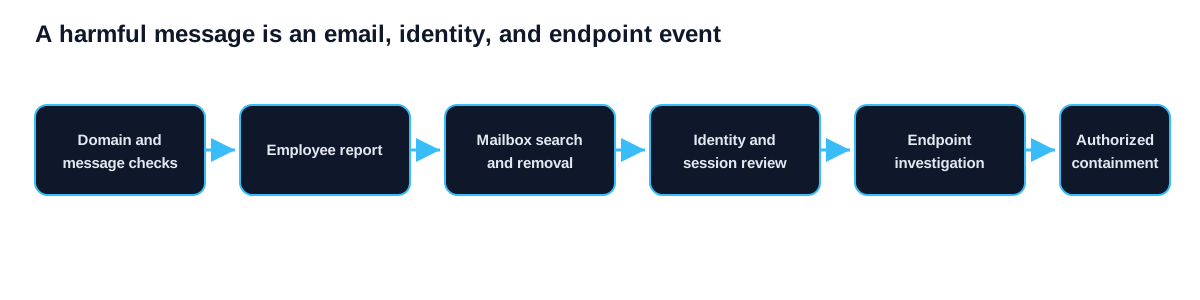
Put email and identity ransomware protection into operation
Use a safe simulation to follow one message and account-risk signal through reporting, investigation, and containment. The initial test is:
- Review domain and mail-flow controls. Name the owner, scope and expected result before changing a control.
- Connect user reports to identity and endpoint review. Record exceptions and dependencies instead of treating partial coverage as complete.
- Test search, purge and session response. Preserve the evidence and assign follow-up work with a retest date.
Evidence to retain
- SPF DKIM and DMARC status should show the current scope rather than a planned future state.
- High-risk exceptions should identify the person or system that produced the record.
- Reporting queue ownership should include the date, limitation and unresolved exception.
- Account and device investigation record should connect the technical result to the affected business service.
Evidence for email-response ages. Review it after a major platform, supplier, identity, policy or staffing change. If the environment no longer matches the tested scope, mark the prior result as historical and schedule a new check.
Review questions
- What bypasses inspection?
- Who reviews reports?
- Can related messages be removed?
- Are active sessions revoked?
- Does endpoint evidence reach the case?
Give mail-flow gaps to the messaging owner, account-response gaps to the identity owner, and investigation gaps to the monitoring or help-desk owner. Repeat the message-to-containment path after correction. The small-business ransomware guide explains how this path connects with endpoint and recovery controls.
Review what happens after one message gets through
No email control can guarantee that every harmful message will be blocked. The practical test is whether the organization can limit harm when a user opens a link, enters credentials or runs an attachment. Review sign-in alerts, endpoint telemetry, mailbox search, message removal, session revocation and account recovery as one response path. Assign authority for each action before an incident.
A short exercise can begin with a reported message and follow the evidence across the email, identity and endpoint systems. Measure whether responders can find similar messages, identify recipients, determine whether credentials were used and preserve the relevant records. This exposes gaps that a filtering dashboard alone will not show. It also gives staff a clear reporting route and helps technical teams decide which alerts require immediate containment.