Vector Database Security for AI Search
Learn the main vector database security risks and the controls that protect sensitive documents, embeddings, metadata, and RAG retrieval.
A vector database helps an AI application find information by similarity. It may store embeddings, document chunks, metadata, and links back to source records. If those records contain client, employee, financial, or operational information, the vector database belongs inside the same security boundary as the source system.
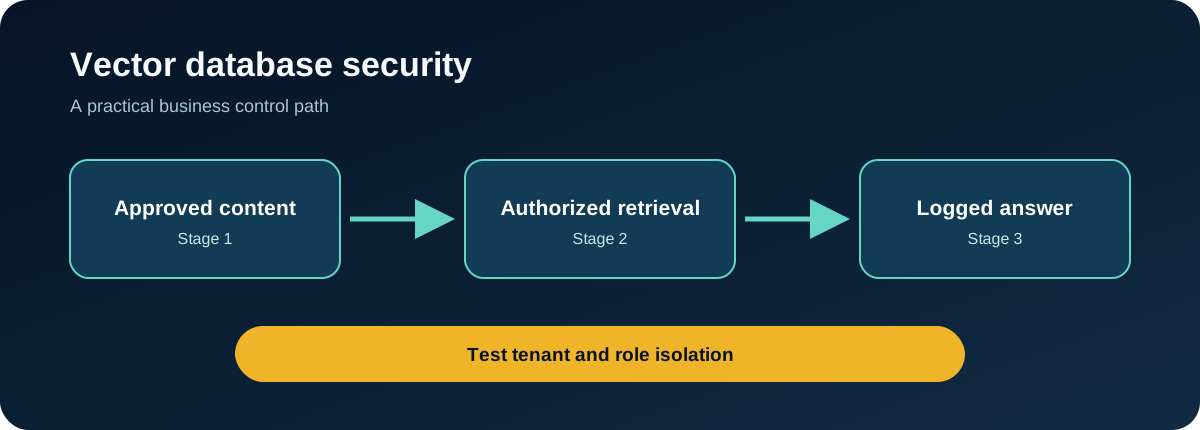
The important question is not whether an embedding looks readable. It is whether an unauthorized person or process can use the database to retrieve sensitive context.
What is a vector database?
A vector database stores numerical representations called embeddings. An embedding captures features of text, images, or other data so an application can find items that are semantically similar to a query.
In retrieval-augmented generation (RAG), the usual flow is:
- A user submits a question.
- The application converts the question into an embedding.
- The vector database returns related document chunks.
- Those chunks are placed in the model context.
- The model uses them to prepare an answer.
This creates two connected security concerns: protecting the stored information and controlling what the retrieval process is allowed to return.
Why vector database security matters
Cross-client data exposure
A shared collection without reliable tenant or access metadata can return one client’s content to another. The model may then repeat that content in a fluent answer, making the underlying access failure less obvious.
Over-permissioned application identities
An application key that can read every collection creates a broad exposure path. A compromised service, agent, or developer environment may reach far more information than the task requires.
Poisoned or untrusted content
Documents placed in a retrieval index can carry false information or instructions intended to manipulate an AI system. Content ingestion therefore needs approval, provenance, and scanning.
Weak deletion and retention
Deleting a source document does not always prove that derived chunks, metadata, caches, or backups were removed. Retention needs to cover the full retrieval pipeline.
Limited visibility
Without query and retrieval logs, a team may not know which records were returned, which identity requested them, or whether retrieval patterns changed.
Seven controls for a safer vector database
1. Classify the stored content
Document the information placed in each collection, its owner, sensitivity, retention period, and approved users. Do not treat embeddings as automatically anonymous.
2. Enforce authorization during retrieval
Apply user, role, client, and classification rules before returning document chunks. OWASP’s RAG guidance specifically warns against shared vector stores without per-chunk access-control metadata.
3. Separate tenants and high-risk datasets
Use separate databases, namespaces, collections, or accounts where the business impact justifies a stronger boundary. Test isolation rather than relying on naming conventions.
4. Give each workload its own identity
Use separate credentials for development, testing, and production. Limit each identity to the required collections and operations, and keep credentials out of source code and browser applications.
5. Control ingestion
Allow only approved sources into the index. Scan files, preserve source ownership and classification metadata, record ingestion events, and make content removal traceable.
6. Protect the service
Use encryption in transit and at rest, supported authentication, private network access where appropriate, current software versions, backups, and tested recovery procedures.
7. Log and test retrieval
Record the requesting identity, query, filters, collections searched, records returned, and administrative changes. Test for cross-user retrieval, missing metadata, unusual bulk queries, and prompt-injection content.
A practical review checklist
- What documents, embeddings, and metadata are stored?
- Can every collection be linked to a business owner?
- Are user and client permissions checked at retrieval time?
- Are production credentials separated from personal and development keys?
- Can the team trace a generated answer back to retrieved records?
- Does deleting a source record remove or expire derived content?
- Are unusual queries, bulk access, and permission changes monitored?
- Has tenant isolation been tested with negative cases?
What to do if vector database access is exposed
Revoke or rotate the affected credential, preserve relevant logs, and identify the collections and operations it could access. Review retrieval activity during the exposure window, contain affected applications, and assess whether sensitive records were returned. Correct the permission or deployment weakness before restoring access.
FAQ
Are embeddings sensitive data?
They can be. Sensitivity depends on the source data, metadata, model, storage design, and how the embeddings can be queried or linked back to records. Protect them according to the business impact of exposure.
Is encryption enough to secure a vector database?
No. Encryption protects certain storage and transport risks, but it does not stop an authorized yet over-permissioned identity from retrieving the wrong records.
Should every client have a separate vector database?
Not always. The right boundary depends on risk, scale, and product design. Shared infrastructure still needs enforceable tenant filtering, scoped identities, and isolation tests.
Build retrieval controls before expanding access
Start with a data inventory, retrieval authorization, separate workload identities, ingestion governance, and useful logs. That gives the business a defensible base before more users, agents, or client records are connected.
Put this control into practice
Start with one AI workflow that handles sensitive, operational, or client information. Document its source permissions, retrieval boundaries, and access evidence. Test the process with a normal request, an unsafe request, and an error case before expanding its use.
QuantM helps Canadian SMBs connect AI governance with identity, Microsoft 365, cybersecurity, and documented business controls. If your team needs a practical baseline, an AI and Cyber Governance Diagnostic can identify the first control gaps to address.
Related AI security guides
- RAG Security: How to Protect the Documents Behind Business AI
- AI Data Provenance and Lineage: Building a Traceable Evidence Trail
- AI Data Loss Prevention for Businesses Using Generative AI
- LLM Input Validation: What to Check Before Data Reaches the Model