Backup Strategies to Limit Ransomware Damage
Design ransomware backups around isolated copies, separate credentials, clean restoration, dependency order, and business-service validation.
To discuss how Data Backup Strategies to Mitigate Ransomware Damage applies to your systems and responsibilities, contact QuantM Technologies for a scoped conversation.
The most effective backup strategy against ransomware follows the 3-2-1-1-0 rule: maintain 3 copies of your data, on 2 different storage types, with 1 copy offsite, 1 copy offline or immutable, and 0 errors verified through regular restore testing. Ransomware specifically targets connected backup systems for deletion, so backups that are not isolated from your network provide a false sense of security.
Recovery priorities
- Follow the 3-2-1-1-0 rule: 3 copies, 2 media types, 1 offsite, 1 immutable/offline, 0 errors
- Ransomware actively targets and deletes connected backups, air-gapped or immutable storage is essential
- Immutable backups cannot be altered or deleted for a defined retention period, even by administrators
- Define Recovery Time Objectives (RTO) and Recovery Point Objectives (RPO) for every critical system
Backups are one part of recovery
Backups are your last line of defense against ransomware. When prevention fails, when detection is too late, and when containment cannot stop the spread, reliable backups are the difference between recovering your business and losing it. But "having backups" is not enough. Ransomware operators know you have backups and they specifically target them for destruction.
Modern ransomware routinely deletes Volume Shadow Copies, encrypts network-attached backup drives, corrupts backup software databases, and compromises backup administrator credentials. If your backups are connected to the same network as your production systems, they will be destroyed alongside everything else.
Recovery design requirements
The 3-2-1-1-0 rule. The classic 3-2-1 backup rule (3 copies, 2 media types, 1 offsite) has been updated for the ransomware era with two critical additions. The extra "1" means one copy must be either offline (physically disconnected from all networks) or immutable (stored on media that cannot be altered or deleted for a defined period). The "0" means zero errors, verified through regular restore testing. Without these additions, ransomware can reach and destroy every copy of your data.
Immutable backup storage. Immutability is intended to prevent alteration or deletion during a defined retention period. Its protection depends on configuration, credentials, retention controls, provider design, and whether the required data and configuration are actually included. It is one layer in recovery, alongside isolation, monitoring, clean identity, documented order, and tested restoration.
Air-gapped backups. Air-gapped backups are physically disconnected from all networks. This can mean removable hard drives stored in a secure location, tape backups rotated offsite, or backup systems that are only connected to the network during the backup window and disconnected afterward. Air-gapped backups are immune to ransomware because the ransomware cannot reach what it cannot connect to.
Recovery Time Objective (RTO). How quickly can you actually restore? Having backups is useless if restoration takes two weeks. Define RTOs for every critical system and verify through testing that you can meet them. A managed backup solution with documented, tested recovery procedures is far more reliable than an ad-hoc approach.
Frequently Asked Questions
How often should SMBs back up their data?
Critical systems (email, ERP, databases, file servers) should be backed up at least daily, with hourly or continuous backups for the most critical data. Less critical systems can be backed up weekly. The right frequency depends on your Recovery Point Objective, how much data loss your business can tolerate.
Can ransomware encrypt cloud backups?
Yes, if the backup uses synchronized or mounted cloud storage that appears as a drive on an infected system. Ransomware can also compromise cloud backup credentials. This is why immutable cloud storage (which prevents deletion or modification for a set period) is essential. Standard cloud sync services (OneDrive, Dropbox, Google Drive) are NOT ransomware-safe backup solutions.
What is the difference between immutable and air-gapped backups?
Air-gapped backups are physically disconnected from all networks. Immutable backups are stored on connected storage but in a format that cannot be modified or deleted for a defined period. Both protect against ransomware, but through different mechanisms. The best strategy uses both: immutable cloud storage for rapid recovery and air-gapped backups as a final safety net.
Design backups around ransomware recovery
Recovery engineering begins with a service that the business must restore. Trace its data, SaaS exports, configuration, identity, encryption keys, backup administration, network requirements, and clean recovery environment. A successful backup job proves that data was copied; only a restore and business transaction prove that the service can return.
Define scope, owners, and proof
Include business system owners, backup administrators, security, continuity leads, and application vendors. Assign one accountable owner and an alternate to each decision. Set the boundary around recovery tiers, copy isolation, credential separation, retention, and clean-room restoration. Record exclusions so leadership can see what the assessment does not prove.
Measure what the exercise establishes
One useful measure for this subject is successful recovery time and recovery point for each critical service. Pair it with control coverage, age of open exceptions, time to reach decision-makers, restore success, and the percentage of remediation items closed by their due dates. Measures need definitions. For example, “response time” may mean alert acknowledgement, analyst investigation, customer escalation, containment, or full recovery. Those are different clocks.
Source and visual plan
- Canadian Centre for Cyber Security business continuity guidance
- Canadian Centre for Cyber Security, Ransomware playbook
- Canadian Centre for Cyber Security, Ransomware threat outlook 2025 to 2027
- PIPEDA section 10.1
Prove that a business service can be restored
Backup design should begin with a recoverable business service, not a storage capacity target. The test must include application data, configuration, identities, encryption keys, network dependencies and the people who confirm that the restored service is usable.
The backup and application owners can begin with one critical application restored into a separated recovery environment. The review should include retention, immutability, credentials, clean infrastructure and downstream connections. Keeping that boundary visible helps participants distinguish a demonstrated result from an assumption about the wider environment.
| Review area | Evidence | Failure to correct |
|---|---|---|
| Recovery copy | Protected retention and separate administration | Production administrators can delete every copy |
| Restore environment | Clean identity, network and compute prerequisites | The plan assumes compromised services are available |
| Application validation | Owner-approved data, permissions and transaction test | Infrastructure starts but the service cannot operate |
| Repeatability | Runbook, evidence, errors and corrective tickets | Success depends on one employee's memory |
Run a safe validation: measure the recovery point and elapsed restoration time, validate permissions and process a representative transaction. Record the expected result, observed result, limitation, owner and retest date. The record is more useful than a generic score because another reviewer can reproduce the check.
Related reading: business recovery priorities, readiness test evidence, incident restoration decisions. Each link answers an adjacent question and keeps this article focused on its own intent.
Put ransomware recovery engineering into operation
Pick one critical service and prove that its data, configuration, identity, and network dependencies can be restored in a clean environment. Use this sequence:
- Classify services by recovery need. Name the owner, scope and expected result before changing a control.
- Protect copies and administration separately. Record exceptions and dependencies instead of treating partial coverage as complete.
- Restore and validate a complete service. Preserve the evidence and assign follow-up work with a retest date.
Evidence to retain
- Copy location and retention should show the current scope rather than a planned future state.
- Separate backup identities should identify the person or system that produced the record.
- Clean recovery prerequisites should include the date, limitation and unresolved exception.
- Business-owner restore acceptance should connect the technical result to the affected business service.
Evidence for recovery-engineering ages. Review it after a major platform, supplier, identity, policy or staffing change. If the environment no longer matches the tested scope, mark the prior result as historical and schedule a new check.
Review questions
- Can production admins delete copies?
- Where will clean identity come from?
- Are keys and configurations protected?
- Who validates application function?
- What failed in the last restore?
Assign failed dependencies to their system owners and repeat the service transaction after remediation. Keep the restore log with the recovery point, duration, exclusions, and business validation. The ransomware protection guide connects this recovery proof to prevention and incident authority.
Retain the software version, configuration source, encryption-key dependency, and identity condition used during the restore so the result can be repeated after the production environment changes.
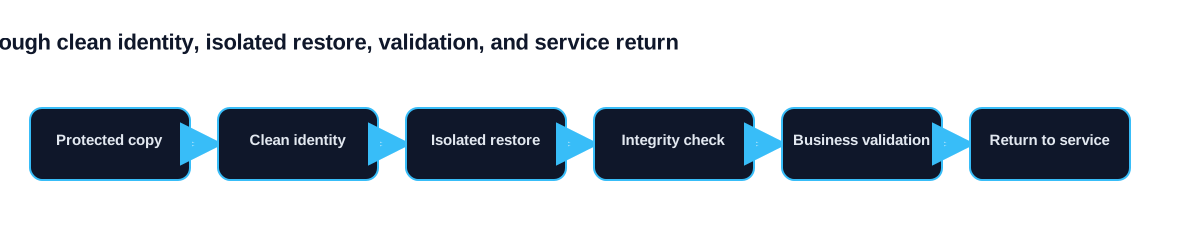
Validate the order of restoration
Applications rarely return to service from a single backup job. Identity, name resolution, databases, file storage, integrations and network rules may need to be restored in a specific order. Document that sequence for each important business service and identify the credentials, encryption keys, vendor access and configuration records needed at every stage. Keep the recovery instructions somewhere the incident team can reach when normal systems are unavailable.
A restore test should confirm more than file presence. The service owner should open the application, complete a representative transaction and verify that dependent systems exchange data correctly. Security staff should confirm that the restored environment is patched, monitored and separated from any systems still under investigation. Record the recovery point, elapsed time, failed steps and manual decisions. Those results give leadership a defensible recovery expectation and show whether the backup design supports the business process it is intended to protect.