Training Employees to Spot Ransomware Attacks
Train employees to recognize and report ransomware-related phishing, credential theft, fake support calls, and suspicious access requests without discouraging reports.
To discuss how Training Employees to Spot Ransomware Attacks applies to your systems and responsibilities, contact QuantM Technologies for a scoped conversation.
Training priorities
- Effective training uses simulated phishing exercises, not just annual presentations
Awareness should change reporting behaviour
Security awareness training transforms employees from the weakest link into an active defense layer. Trained employees do not just avoid clicking malicious links, they recognize and report phishing attempts, creating a human sensor network that supplements your technology defenses.
Training elements to verify
Building a reporting culture. The goal is not zero clicks, it is a culture where employees feel safe reporting suspicious emails without fear of punishment. When employees report phishing attempts, your security team can investigate, remove the malicious email from all inboxes, and update defensive rules. A single employee report can protect the entire organization. Punishing employees for falling for simulations creates fear and discourages reporting, the exact opposite of what you want.
Role-specific training. Different roles face different threats. Finance teams should receive training on invoice fraud, business email compromise, and wire transfer scams. Executives need training on CEO impersonation and whaling attacks. IT staff need training on social engineering targeting technical support. HR should learn about recruitment scams and fake resume attachments. Tailoring training to real-world threats makes it more relevant and more effective.
Frequently Asked Questions
How often should employees receive security awareness training?
Use onboarding, role changes, process changes, observed incidents, and periodic reinforcement rather than relying on one annual event. The right cadence depends on the role and risk. Measure reporting quality and process improvement, not only course completion.
Do simulated phishing exercises actually work?
They can reveal reporting and workflow gaps when scenarios are authorized, relevant, accessible, and followed by coaching. A click rate alone does not prove readiness. Track whether people report quickly, whether responders can investigate, and whether recurring scenarios lead to technical or process changes.
Should employees be punished for clicking simulated phishing?
No. Punishment discourages reporting and creates a culture of fear. The goal is to build a security-aware culture where employees feel safe reporting suspicious activity. Employees who click should receive brief, constructive training explaining what to look for next time. Repeat clickers may need one-on-one coaching, not disciplinary action.
Train for reporting and safe decisions
Awareness training should rehearse the decisions employees make during realistic requests. Use examples involving phishing, attachments, fake support calls, MFA fatigue, credential capture, and unusual payment or file-sharing requests. Measure whether staff use the reporting route and whether the help desk can investigate, not whether everyone completed a slide deck.
Define scope, owners, and proof
Include employees, managers, help desk, identity owners, communications, and security monitoring. Assign one accountable owner and an alternate to each decision. Set the boundary around role-specific risks, accessible training, reporting channels, and follow-up coaching. Record exclusions so leadership can see what the assessment does not prove.
Measure what the exercise establishes
One useful measure for this subject is reporting rate and median time to report a safe internal simulation. Pair it with control coverage, age of open exceptions, time to reach decision-makers, restore success, and the percentage of remediation items closed by their due dates. Measures need definitions. For example, “response time” may mean alert acknowledgement, analyst investigation, customer escalation, containment, or full recovery. Those are different clocks.
Source and visual plan
- Get Cyber Safe ransomware guidance
- Canadian Centre for Cyber Security, Ransomware playbook
- Canadian Centre for Cyber Security, Ransomware threat outlook 2025 to 2027
- PIPEDA section 10.1
Build training around real work
Generic phishing examples are easy to recognize because they do not resemble the messages employees handle. Use safe simulations based on job decisions without copying real confidential messages. Accounts payable may practise verifying an unexpected banking change. Executives can rehearse requests involving credentials or urgent document access. Help-desk staff need a method for validating callers before resetting an account or approving a multi-factor authentication change.
Make the reporting path visible in the email client and document an alternate route when email is unavailable. The security or IT team should acknowledge reports, preserve the message, search for related deliveries, review the sender and links, and decide whether an identity or device investigation is required. Employees should know that prompt reporting is useful even after a click. A blame-based response discourages the evidence the team needs.
Review training results by role, scenario, and reporting behaviour. A click count alone can mislead because a difficult simulation and an obvious simulation are not comparable. Track whether people reported the message, whether the report reached a monitored queue, and whether the response process worked. Use findings to improve both training and technical controls.
Publish a short reporting guide for new employees and contractors. Revisit it when messaging tools, identity processes, help-desk providers, or escalation contacts change, then test the revised path.
Train the decisions employees actually make
Ransomware awareness should help employees verify unusual requests and report suspicious activity. The program should reflect real roles without copying confidential messages. Accounts payable, executives, remote workers and help-desk staff face different requests and need different verification steps.
Scope the review
Use a safe simulation tied to a real work decision as the working example. The awareness and help-desk owners should document reporting channels, identity support, endpoint follow-up and manager coaching. This produces a testable boundary and avoids broad statements that cannot be supported by current evidence.
| Decision point | Required evidence | Weak outcome |
|---|---|---|
| Message review | Sender, destination, request, context and safe verification route | Training relies on spelling mistakes as the main signal |
| Reporting | Visible button and alternate route when email is unavailable | Reports enter an unowned mailbox |
| Identity support | Caller verification and MFA reset procedure | Urgency overrides identity proof |
| Follow-up | Search, account review, device review and employee feedback | A report is counted but no response action is tested |
Preserve the result
Ask the team to send the simulation, confirm reports reach a monitored queue and follow one report through investigation and feedback. Keep the test record with the people involved, current configuration, exceptions and follow-up work. Retest completed changes against the original condition.
Continue with phishing training that changes behaviour, technical email controls, the wider response process when the reader needs the connected procedure. The links use descriptive anchors and keep the cluster navigable without repeating whole sections.
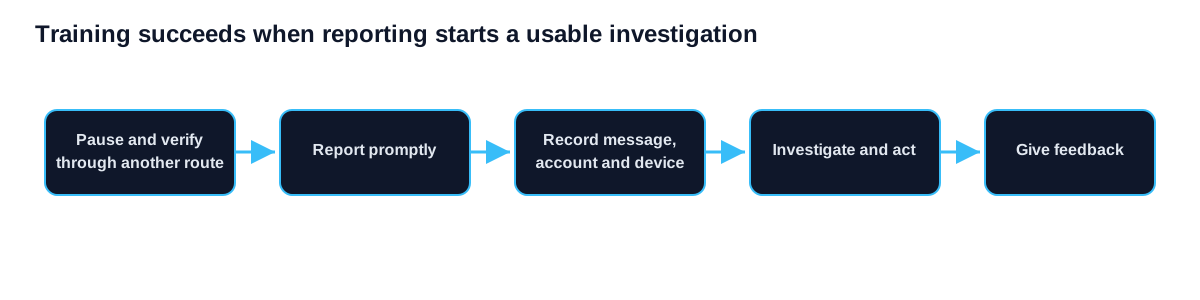
Put role-based ransomware awareness into operation
Test one realistic request with the people who are likely to receive it and the team responsible for investigating reports. Use these steps:
- Identify risky decisions by role. Name the owner, scope and expected result before changing a control.
- Teach verification and simple reporting. Record exceptions and dependencies instead of treating partial coverage as complete.
- Connect reports to technical response and coaching. Preserve the evidence and assign follow-up work with a retest date.
Evidence to retain
- Role and scenario map should show the current scope rather than a planned future state.
- Visible report route should identify the person or system that produced the record.
- Help-desk verification procedure should include the date, limitation and unresolved exception.
- Report investigation record should connect the technical result to the affected business service.
Evidence for awareness ages. Review it after a major platform, supplier, identity, policy or staffing change. If the environment no longer matches the tested scope, mark the prior result as historical and schedule a new check.
Review questions
- Does training resemble real work?
- Can contractors report?
- What happens after a click?
- Who reviews the report queue?
- How does feedback change controls?
Correct unclear reporting instructions, unreachable support channels, or slow investigation handoffs, then repeat the same scenario. The ransomware protection guide shows where employee reporting fits within the wider detection and response process.
Support people after they report
Employees may report after opening a file, entering credentials or approving a login prompt. Training should tell them to stop further interaction, use the reporting route and remain available for questions. It should not tell them to erase messages, shut down devices or investigate on their own unless the response procedure specifically requires that action.
Managers need the same instruction. A punitive response discourages early reports and removes evidence from the response team. Coaching should explain the signal that was missed, the safer verification step and the technical action taken. Repeated issues can then inform mail policies, identity controls or workflow changes instead of being treated only as an employee score.
Include the reporting procedure in onboarding and contractor instructions.
Include the teams attackers are likely to pressure
Generic annual training does not prepare every role for the same decisions. Finance staff may face urgent payment changes, executives may receive impersonation attempts, administrators may be asked to reset access, and service desks may receive calls that exploit an active disruption. Build short scenarios around those duties and the channels each team actually uses.
For every scenario, define the safe action, reporting route and escalation owner. Track whether the report contained enough information for investigation, not only whether the employee clicked a simulated message. Follow up with the affected team when a process makes safe behaviour difficult. For example, an approval path that relies on email alone may need an independent verification step. The training result should therefore feed changes to business procedures, identity controls and incident response. That is more useful than a completion percentage presented without evidence that reporting or decision quality improved.