How MDR Works: From Signal to Response
A step-by-step explanation of how managed detection and response collects signals, investigates activity, contains threats, and hands remediation back to the business.
Managed detection and response (MDR) works by collecting security signals from covered systems, applying detection logic, having analysts investigate suspicious activity, and taking or coordinating approved response actions. The service should also document what happened and identify remediation that remains with the business or its IT provider.
That sequence is more useful than a promise of 24/7 threat monitoring. It shows where the service starts, what the provider can do, and where a customer decision is still required.
The MDR operating flow
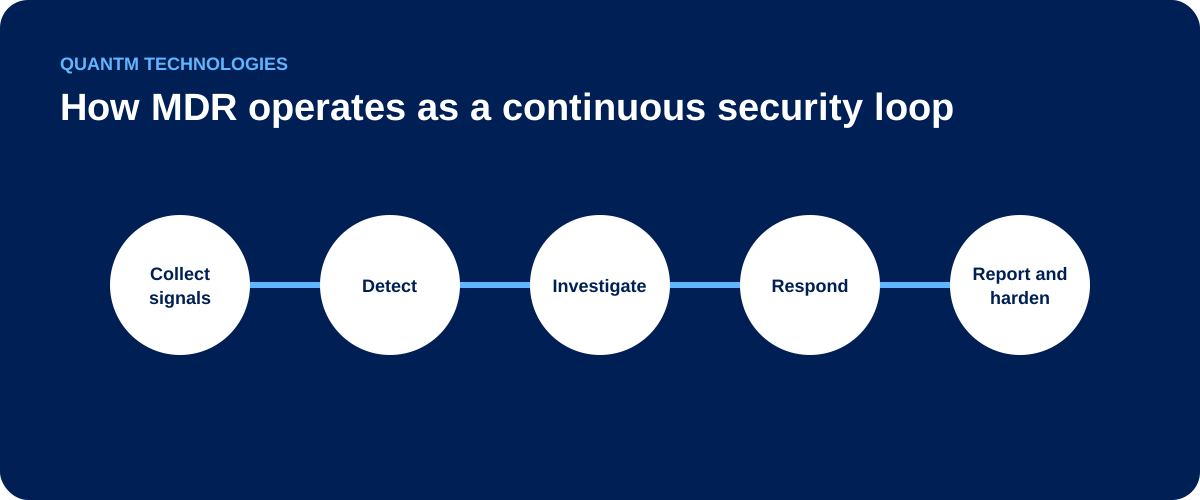
1. Agree on coverage and response authority
Onboarding should identify the endpoints, email systems, Microsoft 365 identities, SaaS applications, and other supported sources that will be monitored. The provider also needs current escalation contacts and written authority for urgent actions.
Response authority varies. One provider may isolate an endpoint when a high-confidence threat is confirmed. Another may require customer approval. Account suspension, session revocation, or changes to production systems can carry business consequences, so those decisions should be agreed before an incident.
2. Collect security signals
The service receives telemetry from the systems included in scope. Endpoint detection and response agents can show process execution and device activity. Microsoft Entra and Microsoft 365 logs can show risky sign-ins, privilege changes, mailbox activity, and suspicious application consent. Email and SaaS tools add evidence from other parts of an attack path.
Coverage is not automatic. If a source is unsupported, disconnected, or never onboarded, the MDR team cannot investigate activity that it cannot see.
3. Detect and prioritize suspicious activity
Detection tools compare events with rules, known indicators, behavioural patterns, and related activity. A single unusual sign-in may not confirm an incident. The same sign-in combined with a new inbox rule, session activity from an unfamiliar device, and an unexpected file download gives an analyst more useful context.
This is why MDR should be assessed as a service, not a dashboard. The value comes from turning raw signals into a decision that someone owns.
4. Have an analyst investigate
An analyst reviews the evidence, checks related users and devices, and decides whether the activity is expected, suspicious, or confirmed malicious. The investigation should answer practical questions: what happened, which assets are involved, whether the activity is continuing, and what action is justified.
Microsoft's MDR overview describes the category as a combination of technology and human expertise used for continuous monitoring, hunting, investigation, and response. Providers differ in which of those functions are included, so the contract and runbook matter more than the label.
5. Contain or coordinate the response
Approved actions can include isolating an endpoint, disabling an account, revoking a session, blocking an indicator, or escalating an incident to the customer. The MDR provider may perform the action directly or guide the customer's IT team, depending on the service agreement.
The NIST incident response guidance connects detection, response, and recovery to broader cybersecurity risk management. MDR contributes operating capacity within that process. It does not own legal decisions, client notifications, business continuity priorities, or every remediation task.
6. Document the incident and improve coverage
A useful incident record includes the timeline, affected assets, evidence reviewed, actions taken, current status, and follow-up work. The team should use that record to tune detections, close telemetry gaps, update the response runbook, and verify that remediation was completed.
Who owns each part of the process?
| Activity | MDR provider | Customer or IT partner |
|---|---|---|
| Connect supported telemetry | Configure and validate ingestion | Provide access, inventory, and licences |
| Investigate alerts | Review evidence and determine severity | Supply business context when needed |
| Contain confirmed threats | Act within written authority | Approve high-impact actions and exceptions |
| Remediate root causes | Recommend and verify where in scope | Patch, rebuild, reset, or reconfigure systems |
| Handle business consequences | Provide incident evidence | Lead legal, privacy, insurance, and client decisions |
What to verify before buying MDR
Ask a provider to walk through one realistic incident from signal to closure. The MDR onboarding checklist lists what to prepare. Confirm the covered data sources, who reviews alerts after hours, what triggers escalation, which actions can be taken without approval, what evidence appears in the incident record, and what work returns to your team.
If you already run antivirus, see MDR vs. antivirus for small business for how the two controls divide the work.
QuantM MDR monitors endpoint, email, Microsoft 365 identity, and SaaS activity through a managed service using purpose-built tools and human response. Start with an M365 Posture Review to identify current visibility and response gaps, or read the broader guide to managed detection and response for SMBs.
Learn more about QuantM's managed detection and response service for Canadian businesses.
FAQ
Is MDR software or a service?
MDR is a managed service. It uses security software, but the service also includes monitoring, investigation, escalation, and response work performed by people and automation.
Does MDR replace an IT team?
No. MDR adds a security monitoring and response function. Internal IT or an MSP still owns business systems, remediation, user support, configuration, and decisions outside the MDR scope.
Can MDR respond without customer approval?
Only within the authority agreed with the customer. Response actions and approval thresholds should be documented during onboarding.