What Is EDR? Endpoint Detection and Response
EDR (Endpoint Detection and Response) watches laptops, servers, and other devices for signs of an attack. It helps security teams investigate and contain threats that slip past prevention tools.
Endpoint detection and response (EDR) is security software that watches company devices for signs of an attack. It collects activity from laptops, servers, and other endpoints, then helps a security team investigate and contain suspicious behaviour. For example, an EDR tool can isolate an infected laptop before ransomware spreads to other systems.
EDR is a detection-and-response layer. It works alongside prevention tools such as antivirus, patching, backups, and identity controls. It does not replace them.
Key Takeaways
- EDR watches endpoint activity and records useful evidence for an investigation.
- It can spot suspicious behaviour, including activity that does not match a known malware signature.
- It can alert a team, isolate a device, stop a process, or guide a response playbook.
- EDR is most valuable when someone can review and act on its alerts.
- Before buying EDR, confirm device coverage, response controls, integrations, and who monitors it after hours.
What Is an Endpoint?
An endpoint is any device that connects to a business network or accesses business data. Common examples include laptops, desktop computers, servers, mobile devices, and virtual machines.
Endpoints are frequent targets because people use them to open email, browse the web, access cloud apps, and sign in to important systems. If an attacker compromises one device, they may try to steal credentials, spread to other systems, or encrypt files.
How Does EDR Work?
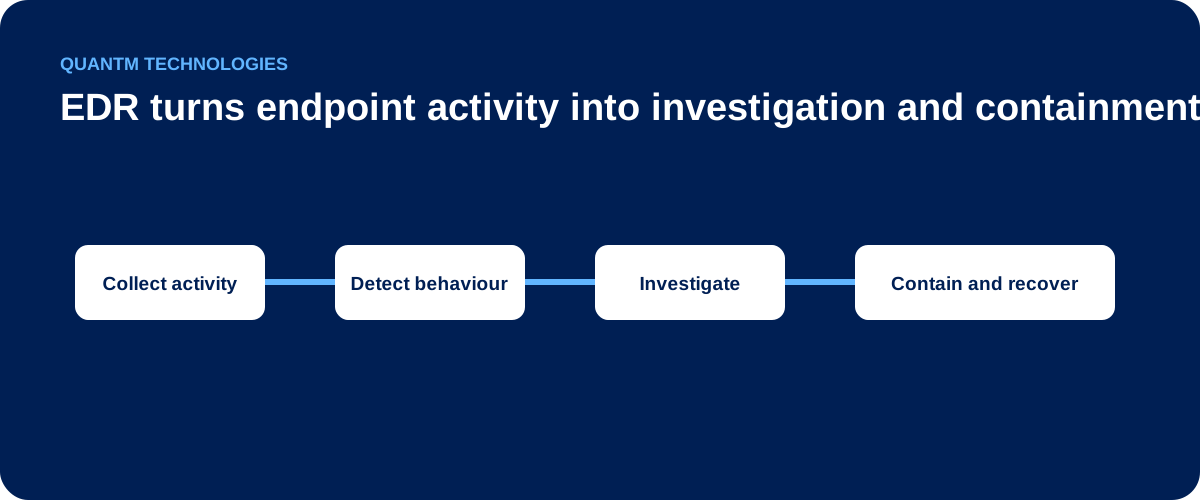
Most EDR platforms use a small software agent on each supported device. The agent sends security-relevant activity to a central console. The platform then looks for known threats and unusual behaviour.
1. Collect activity
The agent records events such as process starts, file changes, sign-ins, network connections, and changes to important system settings. This record helps an investigator understand what happened on a device.
2. Detect suspicious behaviour
EDR compares activity with known indicators and expected behaviour. It may flag a script that launches from an unusual location, a rapid series of file changes, or a login followed by unexpected administrative activity.
3. Investigate the alert
The console gives the security team context: the device, user, process tree, files, and related events. This helps the team decide whether the activity is harmless, suspicious, or confirmed malicious.
4. Contain and recover
Depending on its configuration, EDR can isolate a device from the network, stop a malicious process, quarantine a file, or open an incident for human review. The team can then remove the threat, restore affected systems, and improve controls that allowed the activity.
What Can EDR Detect?
EDR is designed to give defenders better visibility into endpoint activity. Common use cases include:
- Ransomware behaviour, such as rapid file encryption or attempts to disable recovery features.
- Fileless or script-based attacks, including suspicious PowerShell, command-line, or remote-management activity.
- Credential theft, such as unusual access to password stores or suspicious sign-in activity.
- Lateral movement, where an attacker tries to move from one system to another.
- Persistence, where malicious software creates a scheduled task, service, or startup item so it can return after a reboot.
No security product detects every attack. EDR works best as part of a layered program that includes secure configuration, timely patching, protected backups, phishing resistance, and a tested incident-response plan.
EDR vs. Antivirus, EPP, XDR, and MDR
These terms overlap, but they answer different security needs.
| Approach | Main focus | What it adds | Important limitation |
|---|---|---|---|
| Antivirus | Blocking known malicious files | Basic malware prevention | Limited investigation and response context |
| EPP | Preventing endpoint threats | Antivirus, exploit protection, and policy controls | Prevention alone may not explain an active incident |
| EDR | Detecting and responding on devices | Activity records, investigation, containment, and threat hunting | Focuses primarily on endpoints |
| XDR | Correlating across security layers | Visibility across endpoint, identity, email, network, and cloud signals | Depends on useful integrations and operational maturity |
| MDR | A managed security service | People who monitor, investigate, and respond using security tools | Service scope, response authority, and coverage vary by provider |
EDR and antivirus are not opposites. Many modern endpoint platforms include both prevention and EDR capabilities. The practical question is whether the platform can show what happened and whether your organization has a clear way to respond.
What to Look for in an EDR Solution
Choose EDR based on your environment and operating model, not just a feature checklist.
Device and operating-system coverage
Confirm that the product supports the Windows, macOS, Linux, server, and virtual-device environments you actually use. Ask how it handles devices that are remote, offline, or rarely connected to the corporate network.
Response controls
Review what the product can do after it finds suspicious activity. Useful controls may include device isolation, process termination, file quarantine, and remote investigation. Decide which actions can run automatically and which need approval.
Alert quality and investigation context
More alerts do not necessarily mean better security. Look for clear alert details, a readable event timeline, and enough context for a person to make a decision without switching between multiple tools.
Integration with the rest of your security program
EDR should fit with identity, email, firewall, backup, SIEM, and ticketing tools where appropriate. Integration can help a team understand whether an endpoint alert is part of a wider incident.
Monitoring and response ownership
Ask who watches alerts outside business hours, who can isolate a device, and when leadership must be notified. If your internal team cannot provide continuous monitoring, a managed detection and response service may be a better operating model.
A Practical EDR Deployment Checklist
- List the devices and operating systems that need protection.
- Confirm compatibility with existing endpoint protection and business-critical software.
- Define who owns alerts, triage, containment, communications, and recovery.
- Start with a pilot group before deploying agents broadly.
- Tune exclusions carefully and document why each one exists.
- Test device isolation, alert delivery, and the incident-response process before an emergency.
- Review coverage and alert quality regularly as your environment changes.
Who Needs EDR?
Any organization that relies on laptops, servers, cloud access, or remote work should consider how it will detect and contain endpoint incidents. EDR is especially relevant for organizations that handle sensitive information, operate in regulated sectors, or have a small IT team supporting many users and devices.
The right question is not simply, “Do we have EDR?” Ask: “Can we see suspicious endpoint activity, decide whether it matters, and contain it quickly?” If the answer is no, review both the technology and the people and processes around it.
Frequently Asked Questions
What does EDR stand for?
EDR stands for Endpoint Detection and Response. It describes technology that records endpoint activity, identifies suspicious behaviour, and helps a security team investigate and contain threats.
Is EDR the same as antivirus?
No. Antivirus is mainly a prevention tool that blocks known malicious files and behaviours. EDR adds deeper visibility, investigation tools, and response actions for suspicious activity on a device. Many endpoint products combine both capabilities.
Is EDR the same as XDR?
No. EDR focuses on endpoints. XDR brings together signals from more than one security layer, such as endpoints, identity, email, network, and cloud services. An EDR platform can be part of an XDR strategy.
Does EDR replace backups or patching?
No. EDR can help detect and contain an attack, but it cannot replace secure backups, software updates, access controls, and employee security training. Those controls reduce risk before and after an endpoint alert.
How long does EDR deployment take?
The timeline depends on the number and types of devices, existing endpoint tools, application compatibility, and your response process. Plan for a pilot, a phased rollout, validation, and tuning rather than treating agent installation as the complete deployment.
Can EDR work with existing security tools?
Usually, yes. Many EDR products integrate with SIEM, SOAR, identity, firewall, and ticketing tools. Confirm the specific integrations you need during evaluation and test them before relying on them in an incident.
Related EDR guides
Continue with the guide that matches the decision in front of you:
- EDR vs. antivirus
- EDR vs. EPP vs. XDR
- How EDR works
- EDR use cases for SMBs
- EDR and ransomware protection
- How to choose an EDR solution
- EDR deployment best practices
- Managed EDR vs. in-house EDR
- What to expect from managed EDR
- EDR alert fatigue
- EDR and email-borne attacks
- EDR and compliance controls
- EDR, SIEM, SOAR, and Zero Trust integration
- How to evaluate EDR platforms
- Why managed EDR
- Managed EDR onboarding
- Managed EDR SLA checklist
- EDR incident response scenario
- Managed EDR business case
- EDR and managed EDR FAQ
Need a practical endpoint readiness review? Talk to QuantM about endpoint security.