Managed Detection and Response for SMBs
Managed Detection and Response closes the gap between owning security tools and having people actively watch, investigate, and respond to threats around the clock.
The pattern is consistent: attackers are getting better at moving without triggering alerts. And most SMBs are still relying on tools that depend on threats announcing themselves.
Managed detection and response for SMBs addresses that gap. It combines continuous monitoring technology with human-led investigation and response, so that when something suspicious happens in your environment at 2 AM on a Saturday, someone is actually looking at it, confirming whether it is real, and helping contain it before it becomes a business outage.
At QuantM Technologies, we build MDR programs around the attack surfaces where SMBs actually get hit: endpoints, Microsoft 365, identity systems, cloud workloads, and email. Not one of those. All of them, watched together by analysts who know what to look for.
Looking to buy rather than read? See QuantM's MDR services for what is monitored, supported platforms, a sample incident timeline, and what drives price.
Book a Free MDR Readiness Consultation →
Get a practical review of your current monitoring coverage, your likely response gaps, and what a right-sized MDR rollout should look like for your business.
Table of Contents
- What Is Managed Detection & Response for SMBs
- Why MDR Matters for SMBs
- How MDR Works
- What MDR Includes
- MDR vs. EDR, XDR, MSSP, and SIEM
- Signs Your Business Needs MDR Now
- What a Good SMB MDR Partner Should Provide
- How QuantM Technologies Delivers MDR for SMBs
- Frequently Asked Questions
- Related MDR Resources
What Is Managed Detection & Response for SMBs
Managed detection and response is a security service that combines detection technology with human-led monitoring, investigation, and response. The key word is response. MDR is not a monitoring dashboard that sends alerts to your inbox. It is an operating service where trained analysts review suspicious activity, confirm whether it is a real threat, help contain it, and guide your team through remediation before the issue becomes something worse.
For SMBs, that distinction matters more than it might seem. Most internal IT teams are not staffed or trained for 24/7 security monitoring. The person managing your Microsoft 365 tenant and handling help desk tickets should not also be the person responsible for investigating a suspicious authentication pattern at midnight. Those are different jobs with different skill sets, and trying to cover both with the same headcount is how threats go undetected for days.
NIST's Cybersecurity Framework 2.0, including its Small Business Quick-Start Guide, is explicit that detection and response are not optional functions. They are core components of any working cybersecurity program. NIST SP 800-61r3 makes the same point about incident response: it should be an active operating process, not a document that lives in a folder until something goes wrong.
A practical MDR program covers the following functions:
- 24/7 monitoring across the data sources attackers actually touch
- Alert triage and investigation by analysts who add context, not just volume
- Threat hunting to find activity that tools miss or classify as noise
- Response actions to contain threats before they spread
- Reporting and hardening recommendations after each incident
That is the operational difference between owning security tools and having a team actively working them.
Why MDR Matters for SMBs
MDR is valuable when a business has security tools but no reliable way to investigate and respond to meaningful alerts after hours. The guide to 24/7 threat monitoring for SMBs explains what continuous analyst coverage, escalation, and response should include. Modern incidents can involve identity, endpoints, email, cloud systems, and third-party access. A signal in one system can look harmless until it is compared with activity elsewhere.
The NIST Cybersecurity Framework treats detection and response as core cybersecurity functions. MDR gives a smaller organization an operating model for those functions when it cannot staff a security operations centre itself.
Taken together, these trends point to one operational conclusion: alerts alone are not enough. SMBs need detection that catches the low-noise attacks, investigation that separates real threats from false positives, and response capability that can act before an attacker has finished establishing persistence.
Attackers move outside business hours. Credential abuse, lateral movement, and ransomware deployment frequently happen at night, on weekends, and during holidays, when monitoring gaps are widest. MDR closes that window.
Insurance and customer expectations are tightening. Even when MDR is not listed by name in a policy or vendor questionnaire, insurers and enterprise customers increasingly expect continuous monitoring, documented incident response capability, and evidence that security controls are actually being operated. MDR creates that evidence.
Detection without response leaves the job half-done. Knowing an attack is happening is not the same as stopping it. MDR adds the containment and guidance layer that turns a detection into an outcome.
How MDR Works
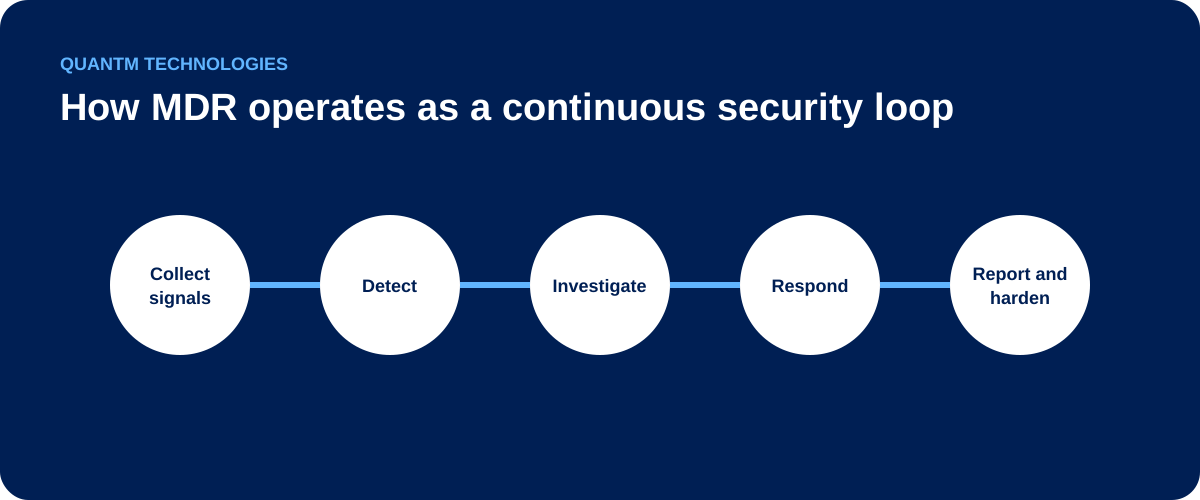
MDR is not a black box. Understanding what actually happens inside the service helps you evaluate providers, set expectations with your team, and hold the provider accountable for the outcomes they promised.
Step 1: Data Collection
MDR begins by pulling security telemetry from the systems attackers target most often. For an SMB environment, that typically means:
- Endpoints and servers (via EDR agents)
- Microsoft 365, Entra ID, and identity systems
- Firewalls and network infrastructure
- Cloud workloads on AWS, Azure, or Google Cloud
- Email security platforms (Defender for Office 365, Proofpoint, and similar)
- SaaS application logs where available
The coverage scope matters. An MDR deployment that only watches endpoints misses identity-based attacks entirely. One that watches only email misses lateral movement. Full coverage requires connecting the data sources that correspond to how modern attacks actually unfold.
Step 2: Detection Logic Runs Continuously
The MDR platform correlates suspicious activity across those data sources in real time. Detection logic looks for behavioral patterns that indicate malicious activity, not just known-bad signatures. That includes:
- Unusual authentication patterns (off-hours logins, impossible travel, new device or location)
- Suspicious PowerShell execution or use of legitimate admin tools for unusual purposes
- Lateral movement between systems a user has never accessed before
- Mass file access or modification patterns consistent with ransomware staging
- Command-and-control traffic on unusual ports or to recently registered domains
- Privilege escalation in Entra ID or Active Directory outside change windows
The goal is to catch what signature-based tools miss: attackers operating within the bounds of allowed software and credentials.
Step 3: Analysts Investigate
This is where MDR separates itself from basic log monitoring. When a detection fires, a trained analyst reviews it. The analyst should have the context and experience to add business meaning to a security signal, rather than follow a tier-1 script.
The analyst looks at the full picture: what happened before the alert, what the user or device normally does, whether the pattern holds together across multiple data sources, and what the likely impact and scope are. That investigation produces a verdict: confirmed threat, suspected threat requiring more investigation, or false positive with tuning recommendations.
A well-run MDR service has a documented mean time to detect (MTTD) and mean time to respond (MTTR). Ask any provider you evaluate for those numbers by incident type.
Step 4: Response Starts Fast
Depending on the agreed service model, response actions can include:
- Isolating a compromised endpoint from the network
- Disabling or suspending a user account
- Blocking a malicious IP address or domain
- Terminating a malicious process
- Revoking an OAuth token or active session
- Escalating to your designated contacts with a clear incident brief
- Coordinating containment and remediation steps alongside your IT team
Speed matters here. The cost of a breach is directly tied to dwell time, which is how long the attacker operated before detection. Every hour of dwell time gives attackers more time to establish persistence, exfiltrate data, and reach additional systems.
Step 5: Documentation, Reporting, and Hardening
After an incident, the MDR team documents what happened, what was contained, what still needs remediation, and how the attack path worked. That documentation serves three purposes: it helps your IT team remediate effectively, it provides audit evidence for compliance purposes, and it produces the recommendations that make the same attack path harder to use next time.
What MDR Includes
Not every MDR provider includes the same scope, and the category label has been applied loosely enough that comparing providers requires asking specific questions. A solid MDR program for SMBs should deliver all of the following.
24/7 monitoring. Threats do not follow business hours. Continuous coverage is not a nice-to-have. It is the core premise of the service. Ask explicitly what happens to your alerts between 6 PM and 8 AM.
Alert triage and investigation. Your team should receive high-confidence, context-rich incident reports, not a daily digest of raw alerts with severity scores. The investigation burden should sit with the MDR provider, not your IT staff.
Endpoint visibility and response. Endpoints remain one of the most common execution points for attackers. EDR coverage across laptops, desktops, and servers is foundational. The provider should be able to isolate an endpoint remotely as part of the service.
Identity monitoring. Monitoring Microsoft 365, Entra ID, VPN authentication, and privilege changes helps identify suspicious use of legitimate accounts. If a provider's scope stops at the endpoint, confirm how identity and cloud alerts will be handled.
Threat hunting. Automated detections catch a lot. Skilled hunters catch what detections miss: stealthy persistence, slow lateral movement, and living-off-the-land techniques that stay below alert thresholds. A monthly threat hunting cadence with documented hypotheses, queries run, and findings is the minimum standard.
Cloud and SaaS visibility. Most SMBs now run significant workloads and data in Microsoft 365, SharePoint, OneDrive, Azure, and third-party SaaS tools. MDR coverage needs to extend into those environments, not stop at the network perimeter.
Guided incident response. During an active incident, your team needs clear answers: what was compromised, what is contained, what needs to be reset, what must be remediated before reopening affected systems. A good MDR provider delivers that clarity in real time.
Reporting and posture recommendations. Monthly or quarterly reporting should cover detection and response activity, open remediation items, threat hunting findings, and specific hardening recommendations. Reporting that only summarizes last month's alerts is not useful.
MDR vs. EDR, XDR, MSSP, and SIEM
| Approach | Primary value | Key limitation |
|---|---|---|
| EDR | Endpoint telemetry and containment tools | Does not by itself provide continuous human investigation |
| XDR | Correlation across more security signals | Depends on integration quality and operational ownership |
| SIEM | Centralized logging and analysis | Requires people and processes to investigate alerts |
| MDR | Managed monitoring, investigation, and response | Scope and response authority vary by provider |
The buying process for managed detection and response is often complicated by overlapping category labels. Here is a direct comparison of what each option actually delivers.
MDR vs. EDR
EDR (endpoint detection and response) is a technology layer: software agents that collect endpoint telemetry and can take endpoint-level containment actions. CrowdStrike Falcon, Microsoft Defender for Endpoint, and SentinelOne are examples.
MDR is the managed service that operates detection and response across your environment. It can include EDR as one component of its technology stack, but MDR adds the analyst layer, the 24/7 operational coverage, the threat hunting, and the guided response that turns an EDR alert into an actual resolution.
You can buy EDR and still miss attacks if no one is watching it consistently. EDR without active management is a tool with no operator.
MDR vs. XDR
XDR (extended detection and response) expands telemetry collection beyond endpoints into identity, email, network, and cloud. Microsoft Defender XDR and Palo Alto Cortex XDR are common examples.
XDR is still a technology platform. MDR is the service layer that operates it. Some MDR providers build their service on XDR platforms; others use SIEM and SOAR combinations. The technology underneath matters less than whether there are analysts actively watching, investigating, and responding.
MDR vs. MSSP
A traditional MSSP (managed security service provider) often focuses on device management, firewall administration, log forwarding, or ticket-driven alert handling. Many MSSPs deliver monitoring without investigation or response. They send you an alert and wait for instructions.
MDR is built around active threat investigation and response, not alert forwarding. The distinction is whether the provider investigates the alert for you and acts on it, or whether they hand it back for your team to figure out. Some providers use both labels, so what matters is what the service actually does.
MDR vs. SIEM
A SIEM (security information and event management) platform (Splunk, Microsoft Sentinel, IBM QRadar) collects and correlates logs at scale. It is powerful infrastructure, but it needs detection content development, tuning, analyst expertise, and ongoing maintenance to produce useful outcomes. Building and operating a SIEM is itself a significant security engineering program.
MDR gives most SMBs the outcomes they actually need, including investigated alerts, containment actions, and incident reports, without requiring them to staff and run a SIEM internally. For organizations that already run a SIEM, MDR can provide the managed analyst layer on top of it.
Signs Your Business Needs MDR Now
Many SMBs wait until after an incident to evaluate MDR. That is the most expensive way to learn. By the time ransomware has triggered, an attacker has typically been in the environment for days or weeks, establishing persistence, mapping the network, and identifying the data worth encrypting.
These are the signals that the gap is already there.
No one monitors security alerts after hours. If your monitoring strategy depends on someone checking a dashboard during business hours, you have a coverage gap that covers most of the hours when incidents actually develop. Credential abuse, lateral movement, and ransomware staging happen when IT teams are offline.
Your security tool stack has grown, but nobody is watching it. An EDR agent, a firewall, Microsoft Defender for Office 365, and a VPN together generate significant telemetry. If that telemetry is not being actively reviewed, triaged, and correlated, you own a monitoring infrastructure with no analyst to run it.
You have dealt with a security incident in the past 18 months. A phishing compromise, a ransomware scare, a business email compromise attempt, or an account takeover that IT had to scramble to contain. Each of those is a sign the current approach is reactive. The next one may not be containable by scrambling.
Cyber insurance renewal is coming. Insurers are asking harder questions about monitoring, incident response capability, and documented controls. MDR is one of the most direct ways to answer those questions with evidence rather than policy documents.
Enterprise customers or partners are asking about your security posture. Vendor security questionnaires, SOC 2 requirements, and procurement security reviews increasingly include questions about continuous monitoring and incident response. MDR provides concrete, documentable answers.
Your IT team covers security as part of a broader role. Generalist IT staff can handle many security tasks well, but continuous monitoring and incident investigation need time, coverage, and a clear response process.
What a Good SMB MDR Partner Should Provide
Not all MDR services are built the same. The category label has been applied to everything from genuine 24/7 detection and response programs to rebranded alert monitoring with a better-looking dashboard. These are the criteria that separate real MDR from its lookalikes.
Transparent onboarding scope. Before signing, you should know exactly which data sources will be connected, what the expected onboarding timeline is, and what your team needs to provide. A provider who cannot give you a clear onboarding checklist is not ready to run a structured engagement.
Documented escalation paths. Ask how incidents are escalated, to whom, at what severity thresholds, and what happens when your primary contact is unreachable. The escalation model should be agreed before an incident, not improvised during one.
Real response capability. Ask specifically what actions the MDR provider can take directly (isolating an endpoint, disabling an account, revoking a session) and what requires your explicit approval. Providers who can only notify you have handed the response burden back to your team.
Coverage across endpoint, identity, cloud, and email. Attack paths can span multiple layers. Confirm explicitly which data sources are included in your service tier and which remain your responsibility.
Evidence of active threat hunting. Ask for a sample threat hunting report from a client in a similar industry. A real hunting program produces specific hypotheses, documents the queries run, and either finds something or comes back clean with a documented rationale. Generic monthly summaries that describe "proactive monitoring activity" are not threat hunting.
Practical, actionable reporting. Monthly reports should tell you what was detected, what was confirmed, what was contained, what still needs remediation, and what hardening actions are recommended. A report that only summarizes alert volume is not useful for making security decisions.
Pricing and scope that fits an SMB. Enterprise MDR programs built around 500-person security teams and million-dollar SIEM deployments do not translate well to a 75-person company. The service design, the analyst workflow, and the onboarding process should all be calibrated for your environment size.
How QuantM Technologies Delivers MDR for SMBs
QuantM Technologies is built for SMBs that need real security outcomes without building an enterprise program. Our MDR service is designed around the environments smaller businesses actually run (Microsoft 365, cloud-first infrastructure, remote and hybrid workforces, and lean IT teams) and the attack surfaces those environments expose.
What We Monitor
Our MDR coverage spans the layers where SMB attacks actually originate and spread:
- Endpoint visibility across laptops, desktops, and servers via EDR agent integration
- Microsoft 365 and Entra ID monitoring: authentication events, suspicious sign-ins, privilege changes, mailbox rule modifications, and OAuth application activity
- Cloud workload telemetry from Azure, AWS, and Google Cloud environments
- Email security signal correlation for phishing, business email compromise, and malicious attachment patterns
- Firewall and network device logs for lateral movement and command-and-control traffic indicators
- Identity and VPN authentication data for credential abuse and impossible travel detection
We do not treat these as separate monitoring programs. They feed into a single correlated detection environment where an analyst can see the full picture of an incident across all affected layers.
How We Investigate
When a detection fires, a QuantM analyst reviews the alert with the full context of your environment. The comparison is to the behavioral baseline we built for your specific users, devices, and normal patterns during onboarding, not a generic baseline. That context is what separates a real investigation from a rules-based triage script.
Analysts document every investigation: what triggered the review, what data was examined, what the verdict was, and why. That documentation is part of your monthly reporting and your audit trail.
How We Respond
Response actions are agreed during onboarding, so there is no ambiguity during an incident. For confirmed threats, we can take direct containment actions (isolating an endpoint, disabling an account, blocking a malicious domain) with notification to your designated contacts. For incidents requiring your input, we deliver a clear brief: what happened, what is contained, what still needs action, and what to do in what order.
Our goal is to reduce dwell time and limit the blast radius while keeping your team informed and in control of the decisions that have business impact.
Onboarding
Most QuantM MDR engagements reach active monitoring coverage within five to ten business days. Onboarding begins with a discovery session to map your environment, confirm the data sources we will connect, and establish your escalation contacts. We deploy or integrate the sensor layer, run integration testing to confirm telemetry is flowing from all expected sources, and deliver an initial findings report before the engagement formally goes live.
We document what normal looks like in your environment during the first two weeks. That baseline is what powers accurate behavioral detection for the rest of the engagement.
Who This Is For
QuantM MDR fits organizations that match these profiles:
- SMBs with 25 to 500 employees running Microsoft 365 and cloud-first infrastructure
- Companies with internal IT staff but no dedicated security operations team
- Businesses that have experienced a security incident and need coverage to improve faster than hiring allows
- Organizations facing cyber insurance requirements, SOC 2 compliance work, or enterprise vendor security reviews
- Leadership teams that need a security partner who can speak both technical and business language
Frequently Asked Questions
What does MDR actually do?
MDR monitors your environment for suspicious activity, investigates detections to confirm real threats, helps contain active incidents, and guides remediation. The operational result is faster detection, faster response, and less damage when an attack occurs, without requiring your IT team to run a security operations center.
Is MDR only for large companies?
No. MDR is valuable for organizations that need dependable monitoring and response coverage but cannot staff an internal security operations centre.
Do I still need antivirus if I have MDR?
Yes. MDR does not replace prevention tools. It builds on them. Antivirus and endpoint protection block known threats at the prevention layer. MDR adds the detection and response layer for the threats that get through, move laterally, or operate entirely within legitimate software and credentials.
What is the difference between MDR and managed SIEM?
Managed SIEM centers on log collection and correlation monitoring. MDR centers on threat validation, investigation, and response. The outcome of a SIEM alert is typically a notification; the outcome of an MDR detection is a confirmed or ruled-out incident with corresponding action taken.
How long does MDR onboarding take?
Most SMB environments reach active monitoring coverage within five to ten business days. The primary variables are the number of data sources to connect, the complexity of the environment, and how quickly admin credentials and access can be provisioned. Smaller Microsoft 365-based environments tend to onboard faster than larger hybrid estates.
Does MDR help with ransomware?
Yes, and the highest-value MDR contribution to ransomware defense happens before encryption starts. MDR detects the early-stage activity that precedes ransomware deployment: suspicious credential use, lateral movement, privileged access abuse, and staging behavior. Catching those signals early is what limits the blast radius.
What happens if there is an incident outside business hours?
MDR coverage does not have business hours. Analysts watch your environment continuously. An incident at 2 AM on a Sunday follows the same investigation and escalation workflow as one at 10 AM on a Tuesday. Your designated contacts are notified based on the escalation thresholds agreed during onboarding.
How is MDR priced for SMBs?
Pricing typically runs per endpoint or per user per month, depending on the provider and scope. At QuantM, pricing is calibrated to SMB environments, so you are not paying for enterprise platform overhead you do not need. A readiness consultation will give you a specific scope and cost based on your environment.
Related MDR Resources
These pages cover related parts of detection and response.
- How MDR Works: From Signal to Response
- Why Small Businesses Need MDR: Five Triggers
- MDR vs. Antivirus: Different Jobs, Shared Purpose
- MDR vs. EDR for Small Business: Who Operates It
- MDR vs. SIEM for Small Business: Who Owns What
- MDR Onboarding Checklist: What to Prepare
- Threat Hunting in MDR: What Analysts Actually Do
- MDR for Cloud Security: Coverage and Responsibility
- Managed Detection and Response Compliance Evidence
- MDR Misconceptions: Nine Questions Buyers Ask
- MDR and Business Continuity: Detection to Recovery
- MDR for Remote Workforce Security: What It Covers
- MDR and Insider Threats: Signals, Context, Limits
- 24/7 Threat Monitoring for SMBs
- Ransomware Protection for SMBs
- What Is EDR? Endpoint Detection and Response Explained
Ready to buy? Review QuantM's MDR services: scope, supported platforms, pricing drivers, and onboarding for Canadian businesses.
Conclusion
Managed detection and response for SMBs closes one of the biggest operational gaps smaller organizations face: the distance between owning security tools and having real people actively watching, investigating, and responding to threats.
MDR should be assessed by its operating model: what it monitors, who investigates, which actions it can take, how it escalates, and what evidence it leaves for recovery and improvement.
If your business does not have 24/7 monitoring, real incident triage, and a clear response path, that gap is already being exploited by attackers who understand it better than most IT teams do.
QuantM Technologies helps SMBs close that gap with monitoring that covers the right attack surfaces, analysts who know what to look for, and response support that fits the size and complexity of your business.
Book a Free MDR Readiness Consultation →
Get a practical view of where your current detection and response posture stands, where the biggest gaps are, and what to address first.